

Connect a Google Spreadsheet with Monday Boards using a CSV file URL - Free App!

  • Jun 21, 2021 1:36 PM UTC
  • 17 replies
  • 7370 views

Yoggie
  • Participating Frequently

Make sure you post answers the following questions so users know exactly what the value is:

- What is your app called?
Monday CSV Converter for Google Sheets

- Why did you build this app?
I needed to connect a Google Sheet with a Monday board so I wouldn’t have to keep updating the both sides.

- What does your app do?
It’ll give you a URL you can copy and paste in you Google Sheet, it’ll pull all the current data from the board.

- What example use cases and workflows does this app apply to? Be specific.
You have a Google Sheet you use for the same report/graphs, and you want to connect it to a Monday board so it’ll fetch the changes every time you open the file.

- Who are you? Are you a monday partner?
My name is Yogev, and I don’t think I’m considered a Monday Partner 🙂

- How can users use your app?
Just go to this address: Monday CSV
Log in with your Monday account so it’ll install the app.
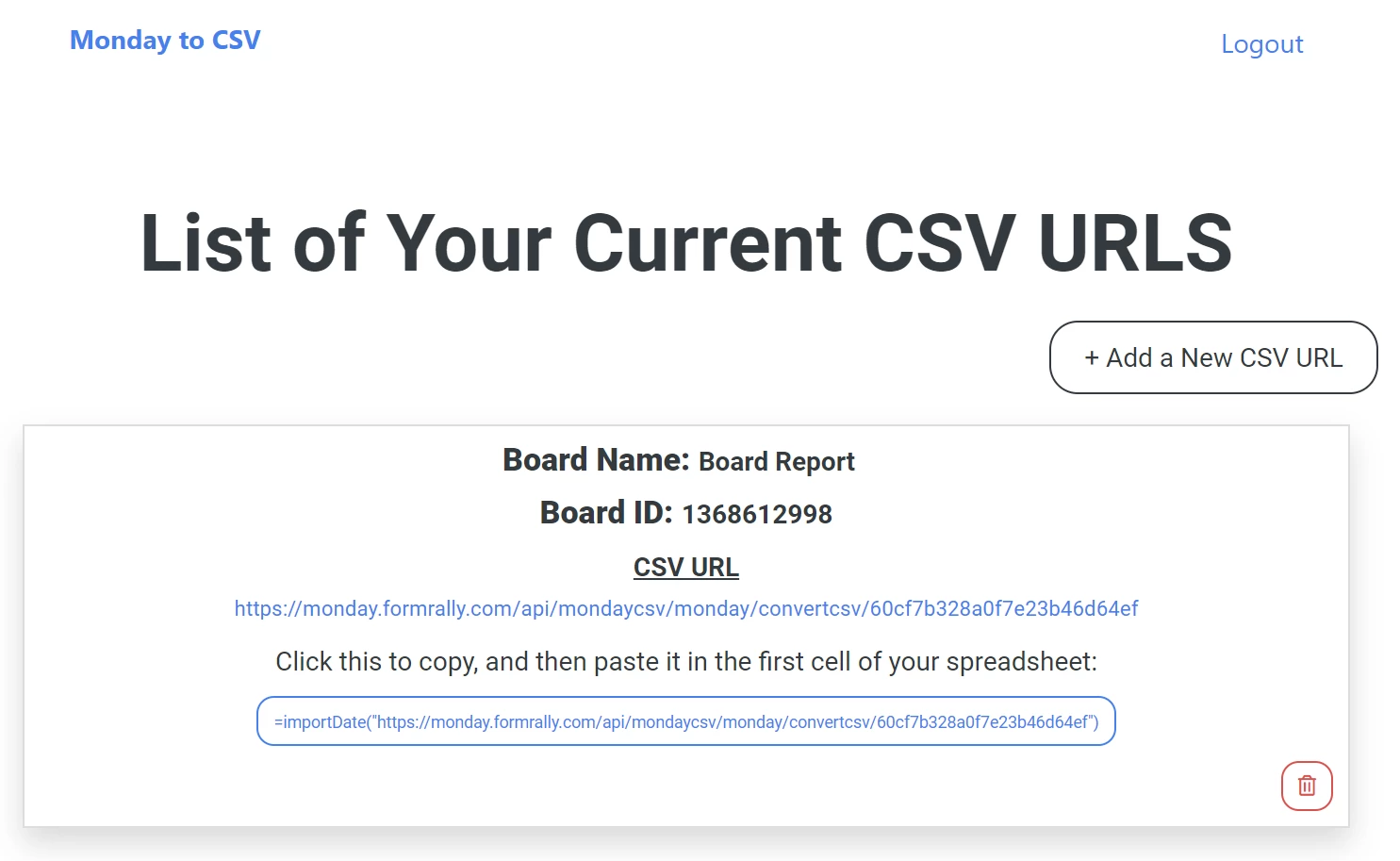
Follow the instructions, I added a screenshot showing a CSV URL.

- Are there any dependencies (eg: must have an enterprise subscription to X tool)
No

- Does it have a cost?
No

Here’s how a new CSV URL looks like, you can add as many as you’d like, they will remain available as long as the board exists on Monday and you didn’t delete the URL from the app.

I hope you’ll enjoy this app 🙂
17 replies

  • New Participant
  • Jan 5, 2022 8:13 AM UTC

Hi Yoggie, that is exactly the solution I am looking for. Can you reactivate the app somehow?


Yoggie
  • Author
  • Participating Frequently
  • Jan 7, 2022 9:35 AM UTC

Hi @metalsludge
Not sure what the problem is, try reinstalling it here:

auth.monday.com

Alchemist
  • monday.com Partner
  • Apr 16, 2022 9:37 PM UTC

This is a really cool app.
Is there any way to automate the refresh of the google sheet without having to open the file?


Yoggie
  • Author
  • Participating Frequently
  • Apr 17, 2022 8:21 AM UTC

@Alchemist
Yes of course.
On your google sheet go to extensions->apps scripts

Paste this template and change the relevant variables:

function myFunction() {
  SpreadsheetApp.getActive().getRange('A1').setValue('=importData("https://twodo-csv-be.herokuapp.com/api/monday/convertcsv/XXXXXXXXXXXXX")')
}

Go yo current project triggers and set up the frequency of the refresh - please don’t make it too frequent as it might lock the integration (it’s a free up so I had to add some rules so it won’t crush).

Hope this helps!


  • New Participant
  • Apr 21, 2022 11:48 PM UTC

Hey Yoggie! THANK YOU! This is awesome!

One question - what’s the best way to handle exporting boards that have subitems or have connected board / mirrored columns? Since this requires 2 (or more) links, how do you import these into excel?


Yoggie
  • Author
  • Participating Frequently
  • Apr 22, 2022 9:53 AM UTC

Hi @rckent!
So glad you found it useful!

Try the MondayReport app:

It might solve your problem.


jekin
  • New Participant
  • Sep 12, 2022 8:26 PM UTC

Hi Yoggie,

Is it possible to do the same on Excel rather than Google Sheets?


  • New Participant
  • Oct 27, 2022 2:55 PM UTC

I want to pull in the time tracking information (date/time/person) from subtasks. We are able to individually pull each report to excel from a main task. Will this URL you created let me pull each into an excel template?
When I pull the full board it does not pull the information of who/date of the time tracking added in subtasks. It only pulls to excel when I select a task and in the subtask column of time tracking pull those to excel… hence the individual pulling issue.


Yoggie
  • Author
  • Participating Frequently
  • Nov 13, 2022 10:03 AM UTC

@jekin Yes!

Contact me at yogev@formrally.com


  • New Participant
  • Jan 10, 2023 11:54 PM UTC

I believe this will be a game-changer for what I’m trying to accomplish. Thank you, @Yoggie

However, I’m having some difficulty getting this app integrated into my Monday process/board(s). I’m certainly not an extremely proficient user of the Monday app and any help would be appreciated.

Is there a step by step process or supporting documentation that can be shared?


  • New Participant
  • Feb 1, 2023 11:09 AM UTC

This is awesome for what we need @Yoggie - And I can see the CSV downloads beautifully. However, when I run the Google Sheet and connect the URL I get the message "Could not fetch URL: https://monday.formrally.com/api/mondaycsv/monday/convertcsv/ with my unique ID edited. Could there be a security setting in Google Sheets preventing handover?


Yoggie
  • Author
  • Participating Frequently
  • Feb 2, 2023 2:14 PM UTC

@MikeyR Please check now - it suppose to work


Yoggie
  • Author
  • Participating Frequently
  • Feb 2, 2023 2:15 PM UTC

Yes the is a was - with the full app
you can contact me if you want it deleveloped and installed on yout account

YogevDavid.yd@gmail.com


  • New Participant
  • Feb 6, 2023 8:40 AM UTC

Thanks Yoggie - because I was under time pressure I reverted to a different solution.


  • New Participant
  • Mar 22, 2023 1:46 PM UTC

תודה רבה יוגב 😃


Yoggie
  • Author
  • Participating Frequently
  • Jun 18, 2023 1:23 PM UTC

בשמחה נשמה - מכל הלב


Yoggie
  • Author
  • Participating Frequently
  • Jul 7, 2023 9:28 AM UTC

This app is no longer free,
For those who are interested please contact me on Yogev@Formrally.com
Or Yogevdavid.yd@gmail.com