[Released!] Accessing time-tracking log via the API

  • July 16, 2019
  • 39 replies
  • 12879 views

Show first post

39 replies

  • New Participant
  • August 11, 2020

+1 for access to specific item sessions via the API


  • New Participant
  • August 25, 2020

Is there any update on when updates will be made in this area? My company signed with Monday.com for their time tracking functionality and we are now very disappointed by what we can do via the API and Export.


@dipro , any update? please 😕


  • New Participant
  • August 28, 2020

Any news on this. I also need it


AlexSavchuk
Forum|alt.badge.img
  • monday.com Team Member
  • August 28, 2020

Hey @MartinSvava, @lizarazomiller, @ccrouse and @dorshiff

Sorry for the delay in response on our end here. I’ve just heard back from the team that we are getting really close to release some further updates here, but need a bit more time to test things out and make sure the new features are ready to use. 🙂 As soon as this is released, I’ll post in this thread to confirm as well.

-Alex


  • New Participant
  • August 29, 2020

Are you looking to make the time tracking session data available in the API in this update?

@AlexSavchuk


  • New Participant
  • October 5, 2020

Any updates, ETA? please


  • New Participant
  • October 13, 2020

Also need this functionality for our project.


  • New Participant
  • November 21, 2020

Where are we on getting a better way to export or access the time tracking data?


dipro
Forum|alt.badge.img
  • Leader
  • November 30, 2020

Hey everyone!

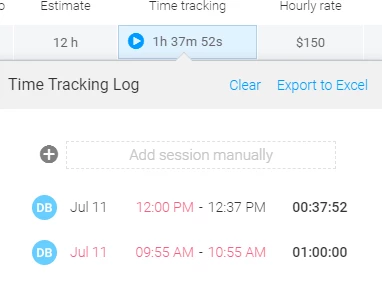
Sorry for the radio silence on this thread. It’s now possible to access the individual time tracking sessions in a cell via the API. In each cell, you can retrieve the additional_values field. This contains a JSON of all the sessions in that cell.

Each session contains the following data:

account_id: 12345,
column_id: "time_tracking",
created_at: "2020-10-29 16:29:27 UTC", // when the session was added to the cell
started_at: "2020-10-29 16:29:26 UTC", // only applicable if the session was added by pressing the play button or via automation
ended_at: "2020-10-29 16:29:28 UTC", // only applicable if the session
started_user_id: 4012689,
ended_user_id: 4012689,
id: 40949481, // unique session ID
manually_entered_start_date: false, // true if the session was manually entered
manually_entered_start_time: false, // true if manually entered
manually_entered_end_date: false, 
manually_entered_end_time: false,
project_id: 162169281, // item ID, 
status: "active",
updated_at: "2020-10-29 16:29:28 UTC"

EDIT: for a full example of a query and the returned data, check out the last post in this thread (link).


  • New Participant
  • November 30, 2020

Thanks dipro!
I’m going to hand this information over to my colleague who will test it.
Would be great, if this works out to fulfill our needs:
Greetings from Vienna,
Ruth


  • New Participant
  • February 1, 2021

I use this M script to conect to the board:

let
Key = “XXXXXXXXXXXXXX”,
Board = “12345678”,
Source = Web.Contents(
https://api.monday.com/v2”,
[
Headers=[
#“Method”=“POST”,
#“Content-Type”=“application/json”,
#“Authorization”=“Bearer " & Key
],
Content=Text.ToBinary(”{““query””: ““query { boards(ids: " & Board & “) { items { name, updated_at, group { title }, columns: column_values { title, text } } } }””}”)
]
),
Data = Table.FromList(Json.Document(Source)[data][boards]{0}[items], Record.FieldValues, {“Title”, “UpdatedAt”, “Group”, “Columns”}),
#“Monday” = Table.FromRecords(Table.TransformRows(Data, each
List.Accumulate([Columns], [
Title = [Title],
UpdateDate = [UpdatedAt],
Group = [Group][title]
], (state, current) => Record.AddField(state, current[title], current[text]) )
))
in
#“Monday”

How cai i access the individual time tracking sessions ?

what should I change in the script ?


lewyt
  • New Participant
  • February 11, 2021

could you please provide a sample query for ‘additional_values’ field?
I have been unable to find this additional_values field:
Field ‘additional_values’ doesn’t exist on type ‘ColumnValue’
Field ‘additional_values’ doesn’t exist on type ‘Query’
Field ‘additional_values’ doesn’t exist on type ‘Board’
Field ‘additional_values’ doesn’t exist on type ‘Item’
Selections can’t be made on scalars (field ‘additional_info’ returns JSON but has selections [additional_values])

EDIT:
actually after some more trial and error I have discovered a correct format:
$query = “{ boards(ids:”.$boardid."){ items(){ column_values() { id text value }}}}";
So it turns out the important data iis found inside Board>Item>column-value>value>additionalvalues


dipro
Forum|alt.badge.img
  • Leader
  • February 11, 2021

Here is an example query that will return this data:

query {
  boards (ids:11111111) {
    items(ids:22222222) {
      column_values(ids:"time_tracking") {
        value
      }
    }
  }
}

The value field will be a JSON string, and inside the JSON there will be an additional_values key. That’s where the time tracking data is!

Here is an example of the returned data (from the query above):

{
  "data": {
    "boards": [
      {
        "items": [
          {
            "column_values": [
              {
                "value": "{\\"startDate\\":1613080702,\\"duration\\":90000,\\"running\\":\\"false\\",\\"additional_value\\":[{\\"id\\":63372124,\\"account_id\\":1825528,\\"project_id\\":162169283,\\"column_id\\":\\"time_tracking\\",\\"started_user_id\\":4012689,\\"ended_user_id\\":4012689,\\"started_at\\":\\"2021-02-10 20:58:00 UTC\\",\\"ended_at\\":\\"2021-02-11 21:58:00 UTC\\",\\"manually_entered_start_time\\":true,\\"manually_entered_end_time\\":true,\\"manually_entered_start_date\\":true,\\"manually_entered_end_date\\":true,\\"created_at\\":\\"2021-02-11 21:58:22 UTC\\",\\"updated_at\\":\\"2021-02-11 21:58:22 UTC\\",\\"status\\":\\"active\\"}]}"
              }
            ]
          }
        ]
      }
    ]
  },
  "account_id": 12345
}

I’m going to close this thread to encourage folks to open new topics for their questions. Please open a new topic in the GraphQL API FAQ category if you have additional thoughts or queries.