[Released!] Accessing time-tracking log via the API

  • July 16, 2019
  • 39 replies
  • 12879 views

I’m trying to build an application that will allow my employer to create custom time-tracking reports (ie time spent per person, per week, per project). However I’m not sure how to access the individual time entries for each project/item. When accessing “column_values” for the time-tracking column I get the general column information (see below)
“title”: “Time tracking”,
“id”: “time_tracking”,
“additional_info”: null,
“text”: “01:37:52”,
“value”: “{“running”:false,“startDate”:1562870160,“duration”:5872,“changed_at”:“2019-07-11T19:37:52.438Z”}”

However the data I need is the data that populates when looking at the time tracking log as shown below.
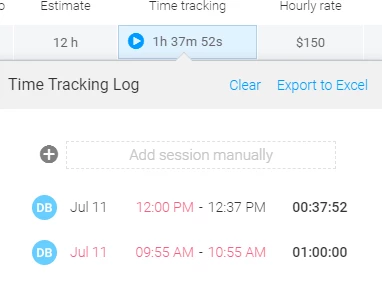
image

39 replies

Ayelet
Forum|alt.badge.img
  • monday.com Team Member
  • July 22, 2019

Hey @Rotikhord,
The access to the time tracking logs is not available yet but we are planning to do it soon.
We are also planning to enable all the time tracking abilities, like start and stop.


  • New Participant
  • August 15, 2019

Any idea how far this feature is?


dipro
Forum|alt.badge.img
  • Leader
  • August 16, 2019

Hey @albac – we don’t have an exact ETA since we are working on a lot of different things. But it is on our roadmap and want to tackle it soon! Watch this space 🙂


d2g_patrick
  • New Participant
  • September 25, 2019

Any update for this feature?


dipro
Forum|alt.badge.img
  • Leader
  • October 2, 2019

Hey @d2g_patrick, no ETA yet, but I’ll pass your vote along to the team!


  • New Participant
  • November 23, 2019

Is there still no ETA as of today?

This is a core requirement in order for our company to use Monday.com. Tracking time spent on each task and being able to export (or at least analyze) this on a per-user/project basis (with the exact dates/time a user has entered) for different purposes (legal, controlling, etc.). As far as I know this is not possible through either automation or API (v1/2), or is there any workaround we’re not aware of?

Would be great if this could be added ASAP, thank you in advance.


JVollaire
  • monday club member
  • February 17, 2020

Hi @Ayelet and @dipro. Our use case is to be able to query out the time track detail so that we can streamline our time worked analysis. Currently we have a “heavily manual” process where we utilize multiple Apps and a spreadsheet to monitor time worked for our internal development teams. We are in a position to automate our processes if we can access this data and will save us a significant amount of time daily which can be converted into productivity and not lost to admin / data capturing. Any idea of ETA on when this data will be available on the API?


  • New Participant
  • February 18, 2020

I’m looking for this feature too 🆙


cv44n
  • New Participant
  • March 4, 2020

Hello, I am also looking for this feature to be added. is there an ETA on this?


clayanderson
  • New Participant
  • March 4, 2020

Also looking for an ETA on this. The time-tracking export format is currently almost useless, because you have to interpolate the pulse name into each of the individual rows for the time-tracking segments. (It’s formatted more like a Word doc than a spreadsheet–which makes it useless for manipulating as a spreadsheet!)

API access to time-tracking data would alleviate this formatting problem for us. As is, we’re trying to figure out our short-term plan. Generating reports each month using this export is TEDIOUS, and we can’t (yet) use an API to fetch the data, so our only other option is to use some sort of time-tracking integration. But I’ve tried several of these, and they’re all terrible.

Please make this functionality a priority!


Winn
  • New Participant
  • April 8, 2020

I’m also struggling to find any sort of solution for tracking time in Monday.com. Here’s what I’ve found so far:

Built-in time tracking

  • Can’t export individual time entries, even via the API

Toggl Integration

  • can only send time entries from Monday.com to toggl when a time entry ends.
  • Entries that are added manually or edited are not sent to toggl.
  • No time entries are synced from toggl back to monday.com

Harvest Integration

  • Completely broken
  • The only option with Harvest is to create a new pulse every time a time entry is added anywhere in Harvest.
  • Every single monday.com project integrated with Harvest receives all time entries entered into every project on Harvest.

  • New Participant
  • April 8, 2020

Hi,
We’re also looking to set up an export of our time track from Monday. We need the time to be split into week long groups for our invoicing. We can get the info we need by doing a manual excel export, but that is a slow, manual process.

All that we are looking for is data export, importing information is not important for our use.


Winn
  • New Participant
  • April 9, 2020

I just heard back from @BenP-monday.com on this topic. Here is what he said:

Unfortunately, we do not have an update when the time tracking via API will be available. It is not on the radar as of now.

As for exporting boards with their raw data as CSV, it’s not possible either. Our current excel export is built to mimic the look of the boards themselves, and we don’t have a stripped-down version for use.

Does anyone else have a work-around for using time entries in any meaningful way?


weblifestores
  • New Participant
  • April 9, 2020

bummer @BenP-monday.com . Not sure how it’s not even on your radar. ???


BenP-monday.com
Forum|alt.badge.img
  • monday.com Team Member
  • April 9, 2020

Hey weblifestores,

Thanks for following up about this. We know this is highly requested and have passed this along to the devs. That’s all we can say about it at this point.

When I say it’s not on the radar, I don’t mean it won’t happen in the future. I mean we haven’t heard anything about it yet. I apologize for the confusion.

When we hear about it, you will as well 🙂

Best,
Ben


weblifestores
  • New Participant
  • April 9, 2020

Great to hear. Thanks for the clarification.


stephenh
  • New Participant
  • April 23, 2020

This feature is very important for us as well!


stephenh
  • New Participant
  • May 12, 2020

With the release of Monday Apps and the upcoming hackathon, are there any new time-tracking parts of the API available?


  • New Participant
  • June 14, 2020

This feature is vital to our workflow. Currently our project manager is spending an entire day extracting the data from the excel sheets as they exist currently. Please make this a priority so we can streamline our workflow and invoicing. Thank you.


  • New Participant
  • June 18, 2020

I’d like to add to this thread. At a minimum, exporting time logs should be a simple thing. I’m doing a test run of Monday.com and I’m loving everything I’ve seen, but Time Tracking is critical to be able to use it for what we need. Especially the ability to export the logs without spending a ton of time doing it.

Thanks !


With some effort I was able to filter this data out from the “activity log” via the API.

Start by querying the activity log for your board, then filter that down by several things:

  • “update_column_value” event
  • the column name of your time tracker (under the json event object)
  • ignore 0 duration logs
  • only “running” logs

That should just about leave you with all the time logs from a particular board. Be careful, this will likely be paginated since it’s a lot of data. From there you can query the pulse_id for more info on each log item.

It’s a lot of data to filter through so I have it running on a nightly cron to keep up to date behind the scenes. It’s quite a few steps do get what you need, but it’s possible.


clayanderson
  • New Participant
  • July 7, 2020

This is absolutely aggravating, Ben. Monday’s core audience are development teams who need to manipulate data, and expect to be able to do so. The fact that there is no good way to access or export simple timetracking data is beyond frustrating. Why in the world can’t you guys generate a simple CSV export? I can’t imagine it would take a developer more than a day or two to implement. The Excel-export-that-thinks-it’s-a-Monday-board is useless. How do you expect people to use this? We don’t need to reproduce the board. We need to manipulate the data for invoicing and budgeting.

Instead, one of my team members has to spend nearly a day each month re-formatting the data to generate the necessary reports. It makes me angry again every month when he has to waste his time doing something that should be dead simple.


Winn
  • New Participant
  • July 15, 2020

@clayanderson We gave up entirely on trying to use Monday’s time tracking because their spreadsheet export was so unusable. Instead, we wrote a browser extension to trigger time tracking in Harvest, and inject the pulse’s name and URL into the time entry. If anyone is interested in this extension, I’d be happy to share it.

@BenP-monday.com Can you please share if there has been any movement to improve time tracking in Monday?


clayanderson
  • New Participant
  • July 17, 2020

@Winn Thanks, Winn – I’d be curious to see that. I had briefly tried to make Harvest (and several others) work, but that frustrated me too. I migrated my team to Monday to avoid having to devote precious dev hours to hacking around limitations like this in other systems…only to find that Monday’s time-tracking is also half-baked. :-/


Winn
  • New Participant
  • July 17, 2020

@clayanderson We’ve made our git repository public. Here’s the URL:

GitLab

There are some instructions in the readme.md file. The only thing you’ll need to do is change the hard-coded harvest ID. This has been working well for us, since it uses Harvest’s time tracking system, which works well. Harvest also has proper csv exports of projects and time entries. I just can’t believe that the spreadsheet export from Monday.com is essentially a webpage export of what is shown on screen, and not a real data export. I’d be surprised if there is anyone who is actually using those exports on a regular basis.