Accessing and upload files using the GraphQL API

  • March 30, 2020
  • 29 replies
  • 28407 views

dipro
Forum|alt.badge.img

Hey community! 🔮

You can now access files that are on your board via our API, and also upload them. Here’s the documentation.

Moderator Note: Check out the following announcement for examples that upload a file from the client-side: Announcement: Uploading files to monday.com has just become easier :)

Reading Files using the API

The assets field represents a file that is uploaded to monday.com. You can query the title of the file, the URL, and also generate a public URL that can be used to download the file. Learn more here.

Uploading Files using the API

Our API also supports uploading files to a file column or update. To do this, you need to send your data as a multipart request (Content-Type: multipart/form-data) with the file in a variable. Here’s more info.

Do note that we have a separate endpoint for files (api.monday.com/v2/file). This endpoint has a higher size limit for requests (20MB, which will be increased to 500MB in the coming weeks).

An example query:

mutation ($file: File!) { 
  add_file_to_column (file: $file, item_id: 256180125, column_id: "files") { 
    id 
  } 
}

Here’s what such a request would look like in Postman:
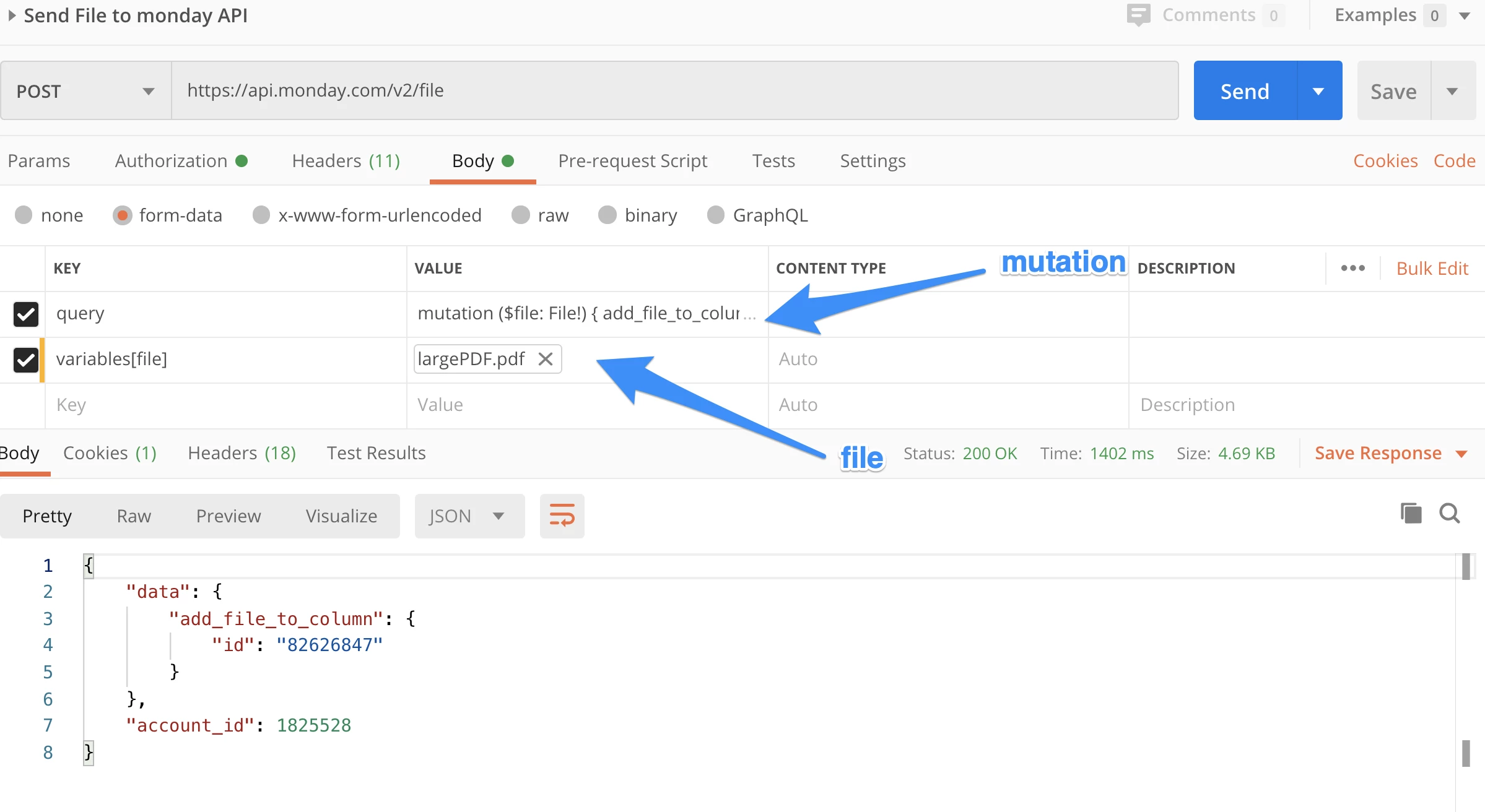
And here’s what that would look like in cURL:

curl \\
  -F query='mutation ($file: File!) { add_file_to_column(file: $file, item_id: 118607269, column_id: "files") { id } }'\\
  -F variables[file]=@/Users/diprobhowmik/screenshots/image.png\\
  -H "Authorization: APIKEYHERE" \\
  https://api.monday.com/v2/file


29 replies

can you upload files into monday via the API?


basdebruin
  • Community Expert
  • April 2, 2020

Hi @dipro, Dipro,

Great stuff, I was able to upload a file to the file column using the Postman example. The next step for me is to upload a file to a file column from my WordPress website using php. I do make successful API V2 call from php for normal queries and mutations but I am wondering how to use FILE! variable as shown in the Postman example.

Do you have any hints to share with regards to php?


dipro
Forum|alt.badge.img
  • Author
  • Leader
  • April 2, 2020

Hey @Jean-DenisCaissie and @basdebruin!

Bas, you should be able to do it via PHP (but I’m not an expert on how). I found a couple of resources that might be able to help though:

  1. The Lighthouse-PHP (a GraphQL server) has a client-side example that users cURL and might be helpful. It is built for their implementation of GraphQL, but the cURL syntax might give you some ideas.

  2. There is a cURL example above, you should be able to adapt this to your PHP environment.

  3. You could also go back to basics and look at the GraphQL specification

I hope this is helpful! If you find a solution, let us know. I’d love for you to post it on our community so others can learn from it.


  • Participating Frequently
  • April 2, 2020

hey @dipro

Great update! We were waiting a long time for this. I already did a test with the curl command, I had no problems and it return the id of the asset , but I tried to do it with python, but I had the next error:

GraphQL query failed with 1 errors
{‘errors’: [{‘message’: ‘Variable file of type File! was provided invalid value’, ‘locations’: [{‘line’: 1, ‘column’: 11}], ‘value’: None, ‘problems’: [{‘path’: , ‘explanation’: ‘Expected value to not be null’}]}], ‘account_id’: 4}

I tried several things with the variables argument, but with no success, any suggestions about what could I be doing wrong?

Thanks !!


dipro
Forum|alt.badge.img
  • Author
  • Leader
  • April 3, 2020

Hey @Carlos-i – we need a bit more information to get to the bottom of this.

Can you create a new topic with a description fo the error (what you have above is fine), your code, and the troubleshooting steps you tried?

This way we have the full context and either I or someone else on the community can give you some tips.


basdebruin
  • Community Expert
  • April 5, 2020

Hi @dipro, @Carlos-i, @Jean-DenisCaissie and others interested,

I experienced the same kind of errors Carlos is mentioning. Depending on the language / environment you are using you really need to find out how to exactly send a multipart request. I am using WordPress/PHP and sending a multipart request can only be done when you build the body of the request by concatenating strings. This is because you need to define a boundary in the header and use the boundary (preceded by ‘–’) in the body. The boundary in my case is a WordPress generated password, but it can be any unique string. Make sure it is really unique because you will run into problems when this string is part of the file contents.

In this piece of code (WordPress/PHP) you see how I use “normal queries” - here to create a new item with the name of the file as it’s item name. When I have the item_id I will then upload the file to the file column and as you can see the body needs to be build by concatenating the correct strings.
Don’t forget to determine the MIME type as monday’s file viewer needs to know. Also you need to make sure that there is an empty line in the body before the actual query and the contents of the file to be uploaded. If you omit these you will get a 500 error returned. See also the comments in the code.

In my WordPress environment MONDAY_TEAM and MONDAY_URL are constants defined in my wp-config file. My secret monday key is stored in the user’s profile field and retrieved by get_field(‘mondaykey’, ‘user_42’). You need to replace those variables with your own to be able to test this yourself.

The code is just the beginning of a larger project, so the full path of the file (on my WordPress server) and the board_id are fixed values for now.

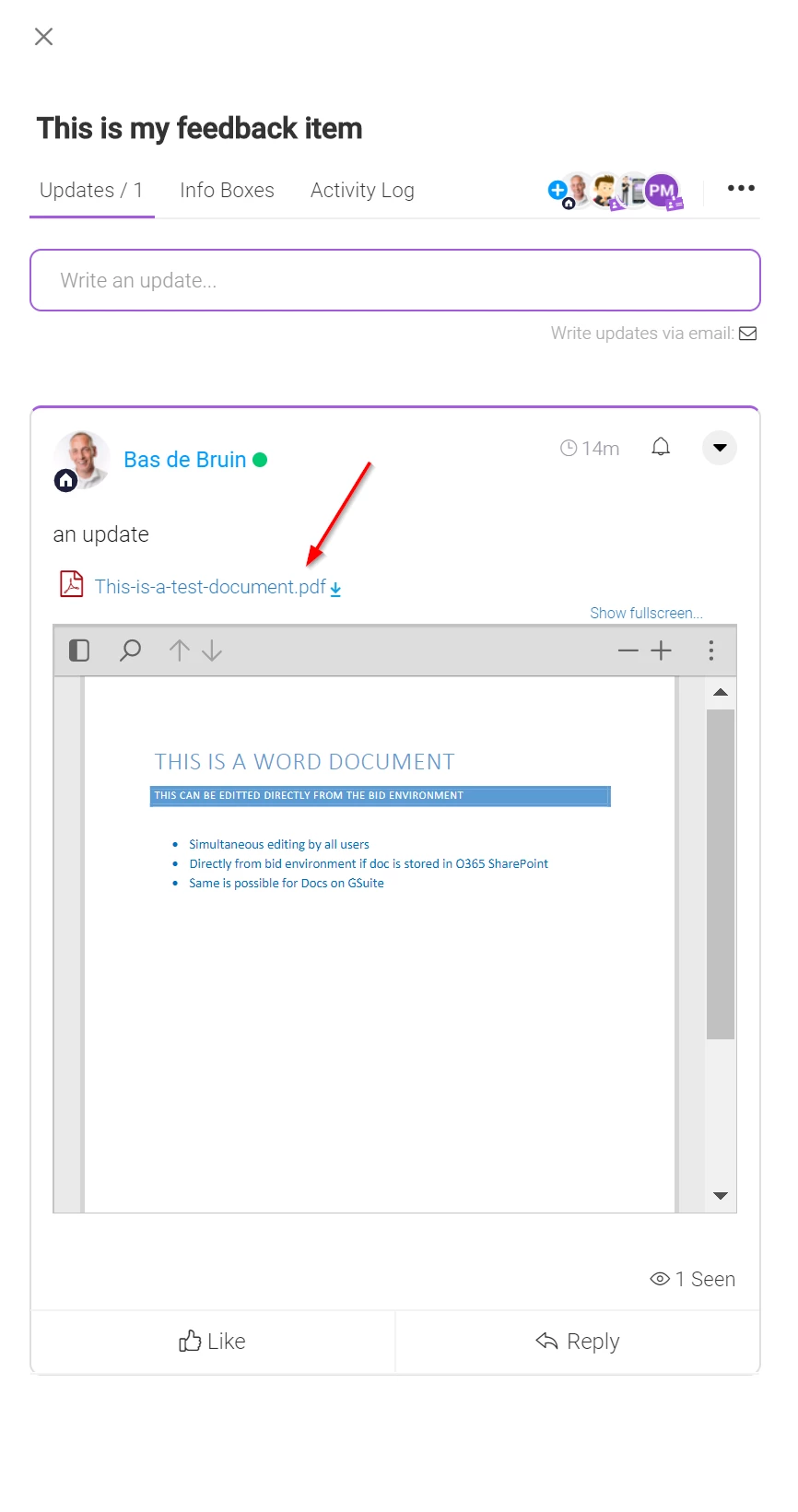
This is the result on the board.

Have fun!

//the board id will be derived from another piece of code, just for now it is fixed
$boardid = ‘515108235’;

//full filepath will be derived from another piece of code, just for now it is fixed
$filepath = ‘/var/www/vhosts/101/292674/webspace/siteapps/WordPress-515402/htdocs/wp-content/uploads/monday/How to use Excellent Monday - 0.8.pdf’;

//fill fparts with [basename] and [filename] and determine the MIME type
$fparts = pathinfo($filepath);
$finfo = finfo_open(FILEINFO_MIME_TYPE);
$fmime = finfo_file($finfo, $filepath);

//create a new item in the board
$header = array(
‘User-Agent’ => MONDAY_TEAM . ’ GraphQL Client’,
‘Authorization’ => get_field(‘mondaykey’, ‘user_42’),
‘Content-Type’ => ‘multipart/form-data’
);

$body = array(
‘query’ => 'mutation {create_item (board_id: ’ . $boardid . ‘, group_id: “topics”, item_name: "’ . $fparts[‘filename’] . ‘") {id}}’
);

$response = wp_remote_post( MONDAY_URL, [‘headers’ => $header, ‘body’ => $body] );
$arr1 = json_decode($response[‘body’], true);
$itemid = $arr1[‘data’][‘create_item’][‘id’];

//generate a boundary, needed for the Header (Content-Type) and the Body (to split in multiple parts)
$boundary = wp_generate_password(24);
$eol = “\\r\\n”;

$header = array(
‘User-Agent’ => MONDAY_TEAM . ’ GraphQL Client’,
‘Authorization’ => get_field(‘mondaykey’, ‘user_42’),
‘Content-Type’ => ‘multipart/form-data; boundary=’ . $boundary //mind the boundary here
);

//we need to build the body from scratch because it is multipart with boundaries
//take care of the extra empty line (twice $eol) before the actual query and file, otherwise an error 500 is returned
$body = ‘–’ . $boundary . $eol;
$body .= ‘Content-Disposition: form-data; name=“query”’ . $eol . $eol;
$body .= 'mutation ($file: File!) {add_file_to_column (item_id: ’ . $itemid . ‘, column_id: file, file: $file) {id}}’ . $eol;
$body .= ‘–’ . $boundary . $eol;
$body .= ‘Content-Disposition: form-data; name=“variables[file]”; filename="’ . $fparts[‘basename’] . ‘"’ . $eol;
$body .= 'Content-Type: ’ . $fmime . $eol . $eol;
$body .= file_get_contents($filepath);
$body .= $eol . ‘–’ . $boundary . ‘–’;

$response = wp_remote_post( MONDAY_URL, [‘headers’ => $header, ‘body’ => $body] );


  • New Participant
  • April 7, 2020

Hello All,
In the API is there is possibility to upload the PDF using the binary data. where the contentType is application/pdf. so you do not need to decode into file and then upload the document.

Thanks
Avi Basappa


Hi @dipro,

Thank you for this update. At the moment we have a problem with uploading bigger files than 2MB, but if we try to upload files using the web app those files are upload without problems. The error which the server returns when we are using the API is: 413 Request Entity Too Large. Do you have in plan to change the limit for uploading files?

Thanks,
Željko


dipro
Forum|alt.badge.img
  • Author
  • Leader
  • April 7, 2020

Allow files as binary data: @abasappa, this is a great point. It isn’t possible at the moment but I’ll pass this along as feedback.

Increase file upload limit: @zeljko-romanovic-mst, at the moment we don’t have plans for this, but I’ll pass this along as feedback as well! If you have larger files than 2MB, you will need to upload them through the web UI.


  • New Participant
  • April 7, 2020

I want to understand how the outlook integration in the monday.com works. How does the attachments data load into monday.com.

Thanks
Avi Basappa


  • New Participant
  • April 28, 2020

Hi,
Is it possible to upload a file to an update?
I connected the whatsapp API so now all the messages insert into the client as an item.
Its really cool!

In additon, Is it possible to send an hook after an update?


dipro
Forum|alt.badge.img
  • Author
  • Leader
  • April 28, 2020

@Omry – that’s super cool! If you have time, it would be awesome if you could create a new topic sharing your Whatsapp use case 🙂

And yes, you can add a file to an update. Check our documentation for more information on this mutation: https://monday.com/developers/v2#mutations-section-add-file-to-update

As for sending a webhook when an update is posted, this is also possible!


  • New Participant
  • April 30, 2020

Hi Dipro,

Can you please write an example, how I can download all files from an item.

Thank you!
Norbert


  • New Participant
  • May 18, 2020

Hi @basdebruin, I tried this method in my wordpress environment, I am getting error “No query string was present”. I am using the same code as yours…only mine is to upload file to an item. Can you help? Also, I would like to know what the constant 'MONDAY_TEAM ’ is?


basdebruin
  • Community Expert
  • May 18, 2020

Hi @moumitapaul, the constant MONDAY_TEAM is just the name of my organization as known in monday.com. Later I recognized this is rdeundant information in the header, so you can leave it out completely.

I tested the below code and it uploads my file to the update. Don’t forget that the update_id is the id of an existing update, you can found the id by clicking the upper right circle down arrow in any update and do “Copy link to update”, the last value in the URL copied is the update_id (in my case 708406624).

All “No query string was present” messages I got in the past (quite a few 🙂) were related to the contents of the body. This is kind of strict.

	//Generate a boundary, needed for the Header (Content-Type) and the Body (to split in multiple parts)
	$boundary = wp_generate_password(24);
	$eol = "\\r\\n";

	$header = array(
		'Authorization' => get_field('mondaykey', 'user_' . get_current_user_id()),
		'Content-Type' => 'multipart/form-data; boundary=' . $boundary
	);

	//We need to build the body from scratch because it is multipart with boundaries
	//Take care of the extra empty lines (twice $eol) before the actual query and file, otherwise an error 500 is returned

	$body = '--' . $boundary . $eol;
	$body .= 'Content-Disposition: form-data; name="query"' . $eol . $eol;
	$body .= 'mutation ($file: File!) {add_file_to_update (update_id: 708406624, file: $file) {id}}' . $eol;
	$body .= '--' . $boundary . $eol;
	$body .= 'Content-Disposition: form-data; name="variables[file]"; filename="' . $upload['name'] . '"' . $eol;
	$body .= 'Content-Type: ' . $upload['type'] . $eol . $eol;
	$body .= file_get_contents($upload['value']);
	$body .= $eol . '--' . $boundary . '--';

	$response = wp_remote_post( MONDAY_URL, ['headers' => $header, 'body' => $body] );

The screenshot shows the update with the file I attached.

Have fun with it!


  • New Participant
  • May 18, 2020

Hi,
Many thanks for this. I forgot to mention I was trying to upload an image file.
Is there something different in the code for image files?


basdebruin
  • Community Expert
  • May 18, 2020

Do a PM because of some URL’s exposed here

Should be the same for image file (I think). Hard for me to test because I filter on file type in another piece of code and do not allow images. Did you recognize the $upload in my code is an array, this is a dump of the array

[18-May-2020 10:58:09 UTC] Array
(
    [name] => How-to-use-Excellent-Monday-0.9.pdf
    [value] => https://excellent-bid.nl/wp-content/uploads/wpforms/47888-c1ec2663446f6d779b5da6991ca9506b/How-to-use-Excellent-Monday-0.9-13a3a57873a27868a751f541df91f6f1.pdf
    [file] => How-to-use-Excellent-Monday-0.9-13a3a57873a27868a751f541df91f6f1.pdf
    [file_original] => How-to-use-Excellent-Monday-0.9.pdf
    [ext] => pdf
    [attachment_id] => 0
    [id] => 3
    [type] => application/pdf
)

It is not very relevant, as long as you understand that you need to replace $upload[‘xxx’] with either the name and the full path on your website.


  • Participating Frequently
  • May 19, 2020

Hello, dear Monday’s support team,

I try to reproduce the upper steps (upload images from my PC via postman request) but unfortunately getting a response with a message: “monday.com is having some technical issues”.

Did I do something wrong or it is a real problem on your side now?


dipro
Forum|alt.badge.img
  • Author
  • Leader
  • May 19, 2020

@SerhiiDiukarev – we aren’t seeing any systemwide issues about this. Can you open a new topic in the community about this issue so we can take a look?


  • Participating Frequently
  • May 19, 2020

juan1
  • Participating Frequently
  • May 21, 2020

Dear monday Team and community.

I am somewhat confused by this example, seeing that the endpoint you are using for the example is api.monday.com/v2 and not api.monday.com/v2/file, as described in https://monday.com/developers/v2#mutations-section-files. I followed your postman example and it worked just as expected, yay! but I want to clarify, which endpoint am I really supposed to use? I am confused by the documentation…

On another note: has someone been able to do this using an apollo client? have been struggling with this for a few days already, I would really appreciate any help


basdebruin
  • Community Expert
  • May 21, 2020

Hi @juan1

I am using endpoint api.monday.com.v2 from the beginning, also for manipulating files. I overlooked the specific endpoint for files and now I am as puzzled as you are?

@dipro, can you shine your light on this?


dipro
Forum|alt.badge.img
  • Author
  • Leader
  • May 21, 2020

Hey folks! @juan1 @basdebruin

Good catch, I’ve gone ahead and updated the post above to include the new “/v2/file” endpoint. We recommend using the “v2/file” endpoint because it has a larger size limit than the normal “/v2” endpoint.


juan1
  • Participating Frequently
  • May 22, 2020

@dipro Thank you for clarifying this point 🙂

I have a problem getting graphQL errors with “no query string was present”. This is how my body looks like, as im using GitHub - jaydenseric/apollo-upload-client: A terminating Apollo Link for Apollo Client that fetches a GraphQL multipart request if the GraphQL variables contain files (by default FileList, File, or Blob instances), or else fetches a regular GraphQL POST or GET request (depending on the config and GraphQL operation). for my project, which bases the request on this spec: GitHub - jaydenseric/graphql-multipart-request-spec: A spec for GraphQL multipart form requests (file uploads)..

------WebKitFormBoundary7657beqttyUsEIOi
Content-Disposition: form-data; name=“operations”

{“operationName”:“add_file_to_update”,“variables”:{“update_id”:711276905,“file”:null},“query”:“mutation add_file_to_update($update_id: Int!, $file: File!) {\\n add_file_to_update(update_id: $update_id, file: $file) {\\n id\\n __typename\\n }\\n}\\n”}

------WebKitFormBoundary7657beqttyUsEIOi
Content-Disposition: form-data; name=“map”

{“1”:[“variables.file”]}
------WebKitFormBoundary7657beqttyUsEIOi
Content-Disposition: form-data; name=“1”; filename=“dummy.pdf”
Content-Type: application/pdf

------WebKitFormBoundary7657beqttyUsEIOi–

this would be equivalent to doing something similar to

curl ‘https://api.monday.com/v2/
-H ‘content-type: multipart/form-data; boundary=----WebKitFormBoundary3bZRDO8h9FUHFNb8’
-H ‘origin: http://localhost:3000
-H ‘sec-fetch-site: cross-site’
-H ‘sec-fetch-mode: cors’
-H ‘sec-fetch-dest: empty’
-H ‘referer: http://localhost:3000/
-H ‘accept-language: en-US,en;q=0.9’
–data-binary $'------WebKitFormBoundary3bZRDO8h9FUHFNb8\\r\\nContent-Disposition: form-data; name=“operations”
{“operationName”:“add_file_to_update”,“variables”:{“update_id”:711286426,“file”:null},“query”:“mutation add_file_to_update($update_id: Int\\u0021, $file: File\\u0021) {\\n add_file_to_update(update_id: $update_id, file: $file) {\\n id\\n __typename\\n }\\n}\\n”}
------WebKitFormBoundary3bZRDO8h9FUHFNb8\\r\\nContent-Disposition: form-data; name=“map”

{“1”:[“variables.file”]}
------WebKitFormBoundary3bZRDO8h9FUHFNb8
Content-Disposition: form-data; name=“1”; filename=“dummy.pdf”
Content-Type: application/pdf


------WebKitFormBoundary3bZRDO8h9FUHFNb8–
–compressed

I think most importantly why this is failing with this error, is because of the way file is set to null.

@dipro do you know if this would be a cause for this type of error?


juan1
  • Participating Frequently
  • May 22, 2020

@dipro

Now that I see your mention to the repo, I am honestly quite lost and frustrated as to why I am receiving this types of errors. In my perspective, the way the postman example works generates a somewhat different kind of cURL command to the one the multipart request you mentioned here, if you could help me clarify this I would be extremely grateful.

compare, taken directly from jaydenseric’s spec:

curl localhost:3001/graphql
-F operations=‘{ “query”: “mutation ($file: Upload!) { singleUpload(file: $file) { id } }”, “variables”: { “file”: null } }’
-F map=‘{ “0”: [“variables.file”] }’
-F 0=@a.txt

with

curl
-F query=‘mutation ($file: File!) { add_file_to_column(file: $file, item_id: 118607269, column_id: “files”) { id } }’
-F variables[file]=@/Users/diprobhowmik/screenshots/image.png
-H “Authorization: APIKEYHERE”
https://api.monday.com/v2/file

according to jaydenseric, the file field is supposed to be replaced by null. Client sending query with files as null · Issue #185 · jaydenseric/apollo-upload-client · GitHub

I highly suspect this is the reason why I get the no string was present error…