Workflow creation for a particular requirement

  • November 9, 2021
  • 11 replies
  • 1461 views

I wanted to make an integration with Monday.com which will extract audit logs through API in JSON format file & wanted to place it on SFTP automatically not manually.

Is that possible ?

Wanted to know the best practice also for the same.

11 replies

AlexSavchuk
Forum|alt.badge.img
  • monday.com Team Member
  • November 11, 2021

Hey @Smiksha,

You can definitely do that by querying the Audit Log API. This is an Enterprise-only feature, though.

You can then save the results of your query wherever you’d like, including your SFTP server. Does that make sense?

-Alex


  • Author
  • Participating Frequently
  • November 11, 2021

Hi Alex,

With the help of the article which you shared below, i have tested the API using postman, but when i am putting the values for start & end_date the given values are not working, meaning the data is not fetched between start_date & end_date given rather it is providing all the data.

thanks,
Smiksha


  • Author
  • Participating Frequently
  • November 11, 2021

Hi Alex,

With the help of the article which you shared, i have tested the API using postman, but when i am putting the values for start & end_date the given values are not working, meaning the data is not fetched between start_date & end_date given rather it is providing all the data.

Moreover, can you let me know how to extract the file & put on SFTP .

I am a beginner to Monday.com 🙂


AlexSavchuk
Forum|alt.badge.img
  • monday.com Team Member
  • November 11, 2021

@Smiksha

Thank you for circling back with me!

Would you be able to provide the Audit Log API query you are trying to run? I would love to see the filtering you are attempting to apply. Please avoid sharing your API key though, as it could give access to your account’s API logs.

Here is a StackOverflow with some example code showing how to save JSON output to an FTP server:

StackOverflow

No worries, the Audit Log API is quite new as well 🙂

-Alex


  • Author
  • Participating Frequently
  • November 12, 2021

Hi Alex,

I wouldn’t be able to provide you the Audit Log API as is.
But this is the API am using, in place of my domain,i have added domain.

domain.monday.com

thanks


AlexSavchuk
Forum|alt.badge.img
  • monday.com Team Member
  • November 12, 2021

@Smiksha

Thank you for circling back with me!

In the query string you seem to be using right now, you are not using any date filtering (there don’t seem to be any “from”, or “to” parameters in the query), and you are only asking for 260 events per page. Is that what you are looking to do? It seems like it might make sense to add more parameters to your query if you’d like to retrieve more data per request.

-Alex


  • Author
  • Participating Frequently
  • November 12, 2021

AlexSavchuk
Forum|alt.badge.img
  • monday.com Team Member
  • November 12, 2021

@Smiksha

That API call seems to work for me if I replace the domain with my account, and use my own API key. 🙂 Is there anything in particular that you’re curious about?

-Alex


  • Author
  • Participating Frequently
  • November 12, 2021

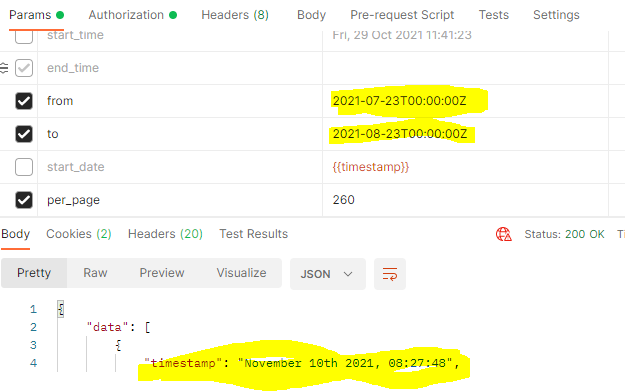
My issue is when m using this API, its not fetching data according to From & TO dates provided.

I need to know how can i should check for the issue.


  • Author
  • Participating Frequently
  • November 12, 2021

I am using this API with Postman.

The output which i am getting is not in between this timestamp.
I tried with start_date & end_date also but that’s also not working.


  • Author
  • Participating Frequently
  • November 12, 2021

image