When creating a new column using monday api and python, Its generating random ids for the columns which I create

  • January 19, 2023
  • 11 replies
  • 1441 views

This is my query. This used to work like charm. But now its not working anymore. For example, If I wanted to create a column with title "User Name" it should create a column with id "user_name", but which is not.
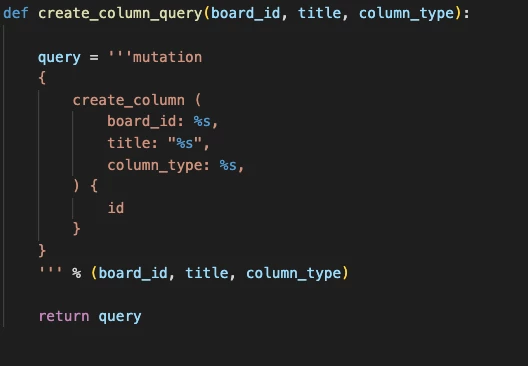

Screenshot 2023-01-19 at 10.51.43 AM

11 replies

kolaai
Forum|alt.badge.img
  • monday.com Partner
  • January 19, 2023

Hello @Ahsan,
Welcome to the community 🙂

It is not possible to assign column ids. Well, previously there were ways you could get around that but not anymore. monday will now always assign them automatically


  • January 20, 2023

Hi @Ahsan,

While our system does assign column IDs, you can always use the API to query your column values and get the assigned column ID information for each item.

Please let me know if you have any more questions!


  • Author
  • New Participant
  • January 21, 2023

@alessandra @kolaai It would be great if your devs can bring back that feature. Its one of the key features that we were using for the automations.


Matias.Monday
Forum|alt.badge.img
  • monday.com Team Member
  • January 22, 2023

Hello @Ahsan,

Thank you for the feedback!

We will share it with our team.

I would not count on this going back to the way it used to work anytime soon, just to set expectations.

Cheers,
Matias


gus.furtado
  • monday.com Partner
  • January 23, 2023

Wow. This must be the worst API change in a while. We couldn’t edit column ids, and now we can’t pre-assign an id to them… Sigh

Can we at least know why it has changed in such a drastic way? I have to justify the developing of a new way of bulk changing columns for a lot of boards and not knowing their ids at creation.


Matias.Monday
Forum|alt.badge.img
  • monday.com Team Member
  • January 23, 2023

Hello @gus.furtado,

As to your question, the old mechanism created very long IDs that impacted our performance.

Thank you for the feedback!

I have shared it with the team.

Cheers,
Matias


gus.furtado
  • monday.com Partner
  • January 23, 2023

Thanks for the feedback! Alright… Performance is always a good reason. We are going to solve this internally.

Thank you again.


Matias.Monday
Forum|alt.badge.img
  • monday.com Team Member
  • January 23, 2023

Thank you for understanding @gus.furtado!


  • Author
  • New Participant
  • January 24, 2023

@Matias.Monday @alessandra @kolaai why can’t you just limit the column ids to be given a specific length while creating the columns. This was one of the key features that our team was using. It would be great if the dev team could account for this.


Matias.Monday
Forum|alt.badge.img
  • monday.com Team Member
  • January 24, 2023

Hello @Ahsan,

I will share your feedback with the team of developers that handles this.

Thank you for it!

Just to set expectations, I would not count on this going back to the way it was any time soon.

Cheers,
Matias


gus.furtado
  • monday.com Partner
  • April 5, 2023

Hi, there @Matias.Monday! Just a heads-up, this subject has been treated positively, as the latest change in the API states:

"Recent changes

February 13th, 2023: If you create a column via the API with a title of 20 characters or less, the column ID will relate to the title. For example, if your column title is This is my column, then the column ID will be this_is_my_column. If your title is more than 20 characters, the system will randomly generate a column ID based on the column_type and an ongoing index. It will not be related to the column title. This update will only impact new columns, not existing ones!"

Awesome!!!