"This page is restricted Error" in Monday App

  • November 29, 2020
  • 8 replies
  • 2103 views

Hi All,

I have developed Monday App with Monday SDK, It is working very well for our company domain “symbo-team.monday.com”.But when I install it on another company domain like “sky-team.monday.com” then I get the error “This page is restricted”.
Note: All related permissions have been applied in “OAuth->Scope” section. (By the way, our account is not paying one.)

Best Regards
Sultan

This topic has been closed for replies.

8 replies

dsilva
Forum|alt.badge.img
  • Participating Frequently
  • November 30, 2020

Hey @engrswadood - was this application shared with particular accounts, or can anyone with a link install this application?

-Daniel


  • New Participant
  • December 18, 2020

Hi @dsilva, Sultan works with me. Anyone with a link can install the application. We also tried to have it work with just particular accounts and it still showed the “This page is restricted” error.


  • Author
  • New Participant
  • December 19, 2020

@dsilva,
I am extremely sorry, as I lost the Monday.com email because of too many Monday emails in my inbox (as I am subscribed to hundreds of boards from different clients).

@EricMonday has explained it. We can not share our Monday.com app with any other account through “anyone with a link install this application”.


Forum|alt.badge.img
  • monday.com Team Member
  • March 10, 2021

Hi @engrswadood and @EricMonday,

Sorry to hear that you’re experiencing this issue! Are you still facing it? Or has it been resolved for you?

Thanks!


  • Author
  • New Participant
  • March 11, 2021

Hi Helen,

Yes, we still have the same issue.
Thanks for the post.


AlexSavchuk
Forum|alt.badge.img
  • monday.com Team Member
  • March 11, 2021

Hey @engrswadood and @EricMonday,

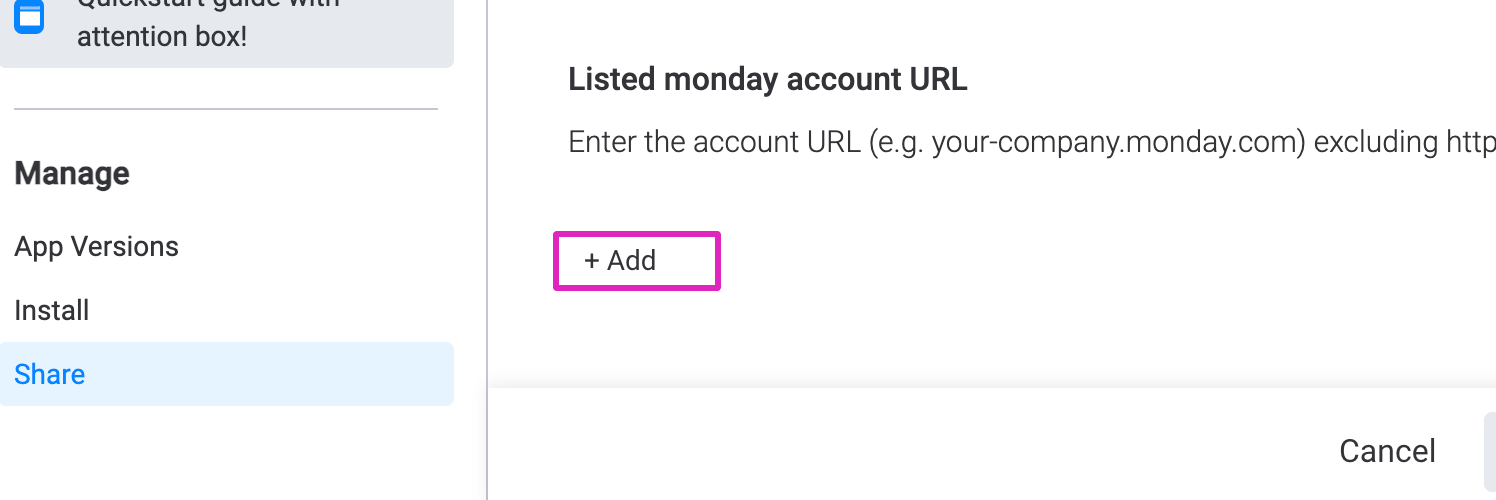
I’m really sorry to hear about this behavior, definitely seems a little odd. Just to make sure we’re on the same page here, have you been able to add the other monday.com account as a Listed account with access to this app? You can do so within the Share section, like so:

Perhaps taking this step might be helpful to ensure the account has access to the app in question?

-Alex


  • Author
  • New Participant
  • March 11, 2021

Hi Alex,

Yes, this approach could work. I will check things, once my boss ask me to start work on it.

Thanks very much.
Sultan


  • March 18, 2021

This topic was automatically closed 7 days after the last reply. New replies are no longer allowed.