Salesforce "No query string was present"

  • December 28, 2020
  • 6 replies
  • 2423 views

Header structure works correctly, used it for a
String query = ‘{ “query” : “{boards(ids:887415581){items(limit:20){id name}} }”}’;

This call works in both Postman and SFDC apex. But when I make the call for mutation with the following string I apply JSON serialize :
String colValue = ‘{"numbers_16":" 42","numbers":"5"}’;
** String str = JSON.serialize(colValue);**

Now I added to the query for the call:
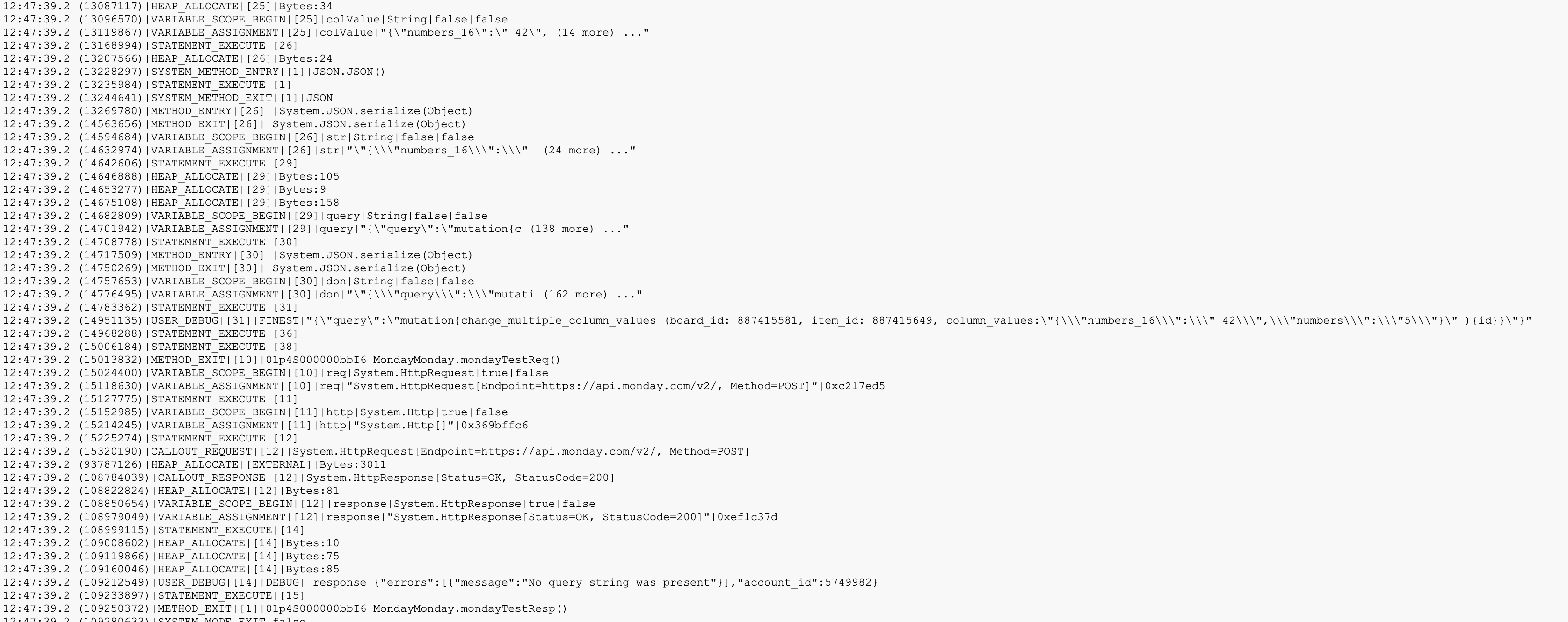
String query = ‘{“query”:"mutation{change_multiple_column_values (board_id: 887415581, item_id: 887415649, column_values:’ + str +’ ){id}}"}';
String don = JSON.serialize(query);

system.debug(LoggingLevel.FINEST , don);
This topic has been closed for replies.

6 replies

  • Community Expert
  • December 29, 2020

Hey @donaldmitchell,

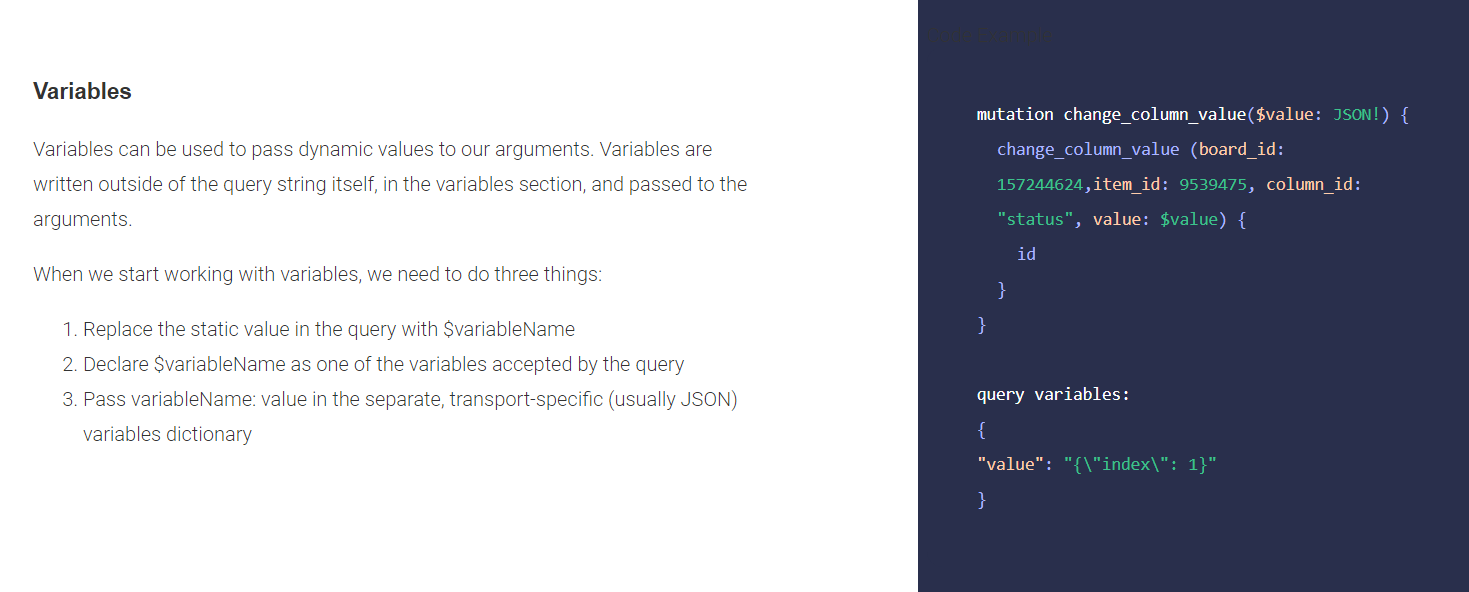
there is a small section in the docs which is easily overseen, but I post it in here for you:

Maybe that already helps.
Also here is the link for the docs so you don’t have to look for it.

Greetings


LaurentConroux
  • Participating Frequently
  • January 4, 2021

Yes, I agree it is easier to use variables rather than trying to insert the data in the query string.

I found early on that it could be tricky to insert the right number of quotes at the right places.

Hope it helps,
Laurent


  • Author
  • New Participant
  • January 4, 2021

I have added the variables that was suggested. I have a couple of results:

  1. When I use Monday’s try-it-yourself with the following query:
    mutation change_multiple_column_values($number16: JSON!){
    change_multiple_column_values(
    board_id: 887415581,
    item_id: 887415649,
    column_values:
    $number16) {id}
    }

Query variables:
{
“number16”: “{“numbers_16”: 5}”,
“numbers”: “{“numbers”: 5}”
}

This works in the try-it-yourself but I can’t seem to create more than one column;

My example: (not working)
mutation change_multiple_column_values($number16: JSON!, $numbers: JSON!){
change_multiple_column_values(
board_id: 887415581,
item_id: 887415649,
column_values:
$number16, $numbers) {id}
}

Query variables:
{
“number16”: “{“numbers_16”: 5}”,
“numbers”: “{“numbers”: 5}”
}

In Salesforce code:

Here is the code string that I am passing:
String query3 = ‘mutation change_multiple_column_values($number16: JSON!){change_multiple_column_values(board_id: 887415581, item_id: 887415649, column_values: $number16) {id}},variables:"{“number16”:"{“numbers_16”: 5}"}’;
String don = JSON.serialize(query3);
system.debug(LoggingLevel.FINEST , don);
request.setBody (don);

Debug log output:
“mutation change_multiple_column_values($number16: JSON!){change_multiple_column_values(board_id: 887415581, item_id: 887415649, column_values: $number16) {id}},variables:{“number16”:”{“numbers_16”: 5}"}"
response|“System.HttpResponse[Status=OK, StatusCode=200]”|0xe83c720
DEBUG| response X {“errors”:[{“message”:“No query string was present”}],“account_id”:5749982}

On this one, I serialized the variables and then passed them to the full query string that was also serialized
“mutation change_multiple_column_values($number16: JSON!){change_multiple_column_values(board_id: 887415581, item_id: 887415649, column_values: $number16) {id}},variables:”"\\"{\\“numbers_16\\”:\\“42\\”""

Same response that I got above.


  • Author
  • New Participant
  • January 8, 2021

I got the following working in Postman graphQL :

mutation change_multiple__column_values($AccelAll: JSON!) {
change_multiple_column_values(board_id: 887415581, item_id: 887415649 column_values: $AccelAll ) {
id
}
}

Variables: (in this case I cover two columns with new values.
{
“AccelAll”: “{“numbers_16”: " 42” , “numbers”: “5”}"
}


  • Author
  • New Participant
  • January 8, 2021

Okay, here is a good working SFDC structure for mutations that work for me I thought I would share:

       HttpRequest request = new HttpRequest();
       request.setEndpoint('https://api.monday.com/v2/');
       request.setMethod('POST');
       request.setHeader('Authorization', token);
       request.setHeader('Content-Type', 'application/json');
      String query = '{\\"query\\":\\"mutation {create_item (board_id: 887415581, item_name: \\\\\\"SFDC 
     Fourth of July \\\\\\"){id}}\\",\\"variables\\":{}}';

request.setBody (query);

Wrap this in a method and should be work.

One observation, when you run apex mutation call and also have an active Monday.com to SFDC integration running. It may generate duplication notification for Account or other sObjects. You can find this Data Management > Duplicate Management > Duplicate Rules.

Currently working with Monday.com for resolution.

Thanks,
Don


  • March 10, 2021

This topic was automatically closed 7 days after the last reply. New replies are no longer allowed.