Return specific columns using GraphQL

  • June 1, 2021
  • 8 replies
  • 2817 views

Hello!
I would like to get more columns on my board, but I can only get the id and name, all other fields are said
Field ‘team’ doesn’t exist on type ‘Item’
I’m making a filter by date, I don’t know if it’s the most correct either.

how can i get all columns in fields ?

I’m using mondy’s Api, with javascript. I have the following code structure:

async getCelebrateOnPeriod(date: string): Promise<any> {
    const { query, variables } = gql.query(
      this.clientQuery.getOnCelebrationOnPeriod(
        this.boardId,
        date,
        date,
      ),
    );

    const data = await this.mondayApi.api(query, { variables });

getOnCelebrationOnPeriod(
    boardId: number,
    columnId: string,
    date: string,
  ) {
    return {
      operation: 'items_by_column_values',
      variables: {
        board_id: {
          value: boardId,
          required: true,
          type: 'Int',
        },
        column_id: {
          value: 'date4',
          required: true,
          type: 'String',
        },
        column_value: {
          value: date,
          required: true,
          type: 'String',
        },
      },
      fields: ['id', 'name', 'texto_longo'],
    };
  }
}

This topic has been closed for replies.

8 replies

AlexSavchuk
Forum|alt.badge.img
  • monday.com Team Member
  • June 1, 2021

Hey @GabriellaSelbach 👋

Thanks for reaching out! That’s a great question, and I’d also like to take the opportunity to welcome you to our community 🙂 I hope you enjoy your stay and find the answers you are looking for!

Just to make sure we’re on the same page here, would you be able to clarify exactly what kind of data you are looking for? As far as I understand, you are using the items_by_column_values query, which already searches for a specific value in a specific column. Would you be able to clarify what you’d need to return in terms of data?

I’d love to make sure we align here, so that I can provide the most relevant info back 🙂

-Alex


Hi @AlexSavchuk . I’m new to monday so I may have made a lot of mistakes.
What I’m trying to do, I want to get from my board, all items of a certain date, with some specific columns or all.


AlexSavchuk
Forum|alt.badge.img
  • monday.com Team Member
  • June 1, 2021

@GabriellaSelbach

Ahh, thank you so much for clarifying what you’re looking for! When querying for a Date’s column values, you will need to query in a “YYYY-MM-DD” Format. Here’s an example query you can use as a reference point:

query {
  items_by_column_values (board_id:$BoardId, column_id:"date4", column_value: "2021-06-01") {
    id
    name
    column_values {
      text
      title
      id
      value
    }
  }
}

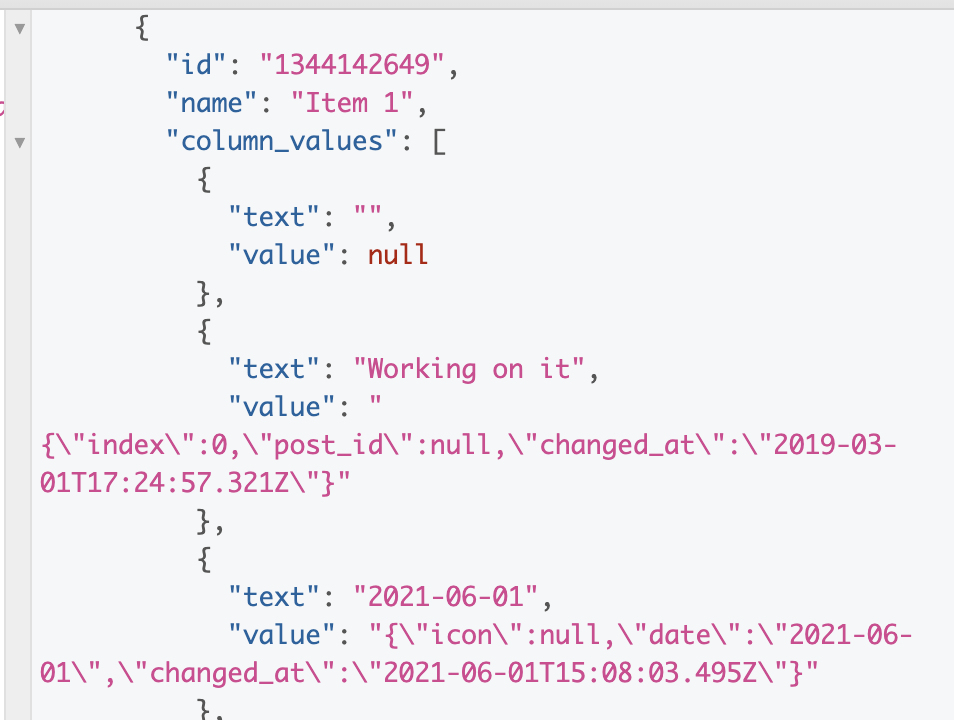
This will return the following items:

This query will then return the JSON value and the text value of other columns for those items as well:

I hope this helps clarify 🙂

-Alex


@AlexSavchuk very very thanks 😊.
I Would of know how have conditions, for example:

query {
items_by_column_values (board_id: 1321104761, column_id: "date4", column_value: "2021-05-31", column_id: "name", column_value: "gabriella staniecki") {
id
name
 column_values {
      id
      value
    }
}
}

AlexSavchuk
Forum|alt.badge.img
  • monday.com Team Member
  • June 2, 2021

@GabriellaSelbach

I’m glad I could help!

Ah, I see. You are looking to query items_by_column_values for multiple columns, is that correct? I’m afraid we do not provide this as an option at this time, but it’s definitely something we are considering to implement in the future. 🙂 I can’t provide an ETA or timeline on this just yet, though.

-Alex


@AlexSavchuk aah right i’m waiting for the functionality. Another question and would this be possible, use logical operator, to say column_value > ‘2020-03-12’?

{
  items_by_column_values(board_id: 1321104761, column_id: "date4", column_value>: "2021-06-02") {
    id
    name
    column_values {
      text
      id
    }
  }
}

AlexSavchuk
Forum|alt.badge.img
  • monday.com Team Member
  • June 3, 2021

@GabriellaSelbach

I’m afraid that is also not an option at this time - instead, I would recommend querying the values of that specific column, and then filtering and sorting the values in your application programatically.

I do understand this would be more convenient via the API directly, so I’ve gone ahead and passed that as a feature request as well 🙂 I hope this helps.

-Alex


  • June 10, 2021

This topic was automatically closed 7 days after the last reply. New replies are no longer allowed.