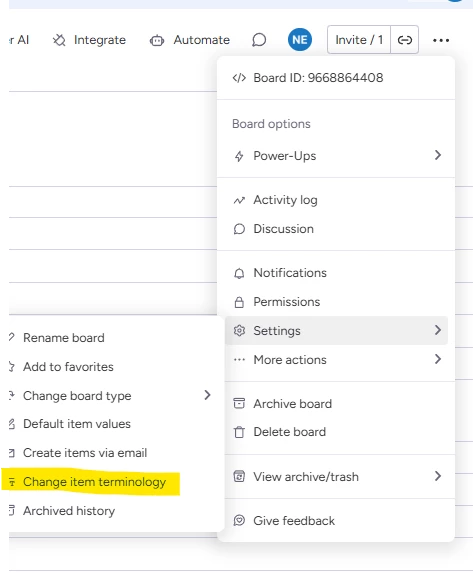
Rename the 'Name' column using the API from 'Item'?

  • July 7, 2025
  • 4 replies
  • 105 views

Hi,

Does anyone know of any way to change the default column with id ‘name’. I’ve tried using mutation {change_column_title … but that doesn’t seem to do anything. Is there any way to do this?

4 replies

dvdsmpsn
Forum|alt.badge.img+1
  • Participating Frequently
  • July 7, 2025

I don’t think that’s part of the public API, so not possible without using the monday UI.

The exact call in the browser sends the equivalent of this curl:

curl 'https://myslug.monday.com/boards/1234' \\
  -X 'PUT' \\
  -H 'X-CSRF-Token: *****' \\
  ...
  -H 'Accept: application/json, text/javascript, */*; q=0.01' \\
  -H 'Content-Type: application/json' \\
  -H 'X-SOURCE-PRODUCT-KIND: core' \\
  --data-raw '{"pulse_nickname":{"preset_type":"other","singular":"My custom name","plural":"My custom names"},"caller":"set-pulse-nickname-component"}'  

Also, asking “Ask AI” I get:

Is there a way to Change item terminology using graphql?

I’m sorry, but the knowledge sources do not contain any information about changing the item terminology (nickname for items on a board) using GraphQL or the monday.com API. The item_terminology field is available as a read-only field when querying board details, but there is no documented mutation or API method to update it programmatically Api-reference > Reference > Boards}(Boards).

If you need to change the item terminology, you will likely need to do so manually through the monday.com web interface.


hellotimi
  • Participating Frequently
  • July 24, 2025

I believe you can use this mutation:


mutation {
change_multiple_column_values(item_id:9876543210, board_id:1234567890, column_values: "{\"name\" : \"My Item\"}") {
id
}
}


https://developer.monday.com/api-reference/reference/name#update-the-name-column


dvdsmpsn
Forum|alt.badge.img+1
  • Participating Frequently
  • July 28, 2025

@hellotimi This is about changing the title of the column from, say “Item” to “Contact”, not the value contained inside the name.


  • New Participant
  • July 28, 2025

It isnt really supported programmatically but can be changed from the UI. You can choose a custom name and then template the board so you dont need to set it each time.