PHP array into board column

  • April 25, 2021
  • 13 replies
  • 2106 views

  • Participating Frequently

Greetings everyone! Well folks I have an array in PHP

$ arr = [“a”, “b”, “c”];

And I wanted to know which type of column is most suitable for placing the array values ​​in a monday column inside a board

Thank you very much for reading and if possible answer me = D

This topic has been closed for replies.

13 replies

Forum|alt.badge.img
  • monday.com Team Member
  • April 26, 2021

Hi @mpaon!

It sounds like in this case you would want to utilize something like our Dropdown column or a Status column.

Are these values meant to be selected individually? Or in a combination? This will determine which column type you want to store them in (i.e. Status for individual selection, Dropdown for multiple selections).


  • Author
  • Participating Frequently
  • April 26, 2021

Helen I get the values into a external json and save in a php array and each value in a index of the array. In example

$arr = [a,b,c] 

I would like save into column in same form the first item is a and the last it’s c


Forum|alt.badge.img
  • monday.com Team Member
  • April 26, 2021

Ahh okay. How would you like these values to be presented though?

Would you like them to be listed out? Or would you like them to be selectable (meaning a user is able to select one or multiple values in this array)?


  • Author
  • Participating Frequently
  • April 26, 2021

listed format please! But I would like selectable form ( in future use this mode too)


Forum|alt.badge.img
  • monday.com Team Member
  • April 26, 2021

Okay! In this case, I think your best bet is to utilize something like the Text column or a Long Text column. You can even post this information inside of an Update for an Item!

This way, you can see all of the values listed out (instead of segmented into separate labels).


  • Author
  • Participating Frequently
  • April 27, 2021

@Helen When I send the array to monday, graphQL returns that the text type is not valid = /


Forum|alt.badge.img
  • monday.com Team Member
  • April 27, 2021

Hi @mpaon!

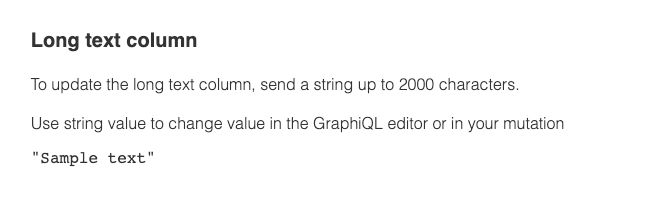
You can find the structure for updating our Long Text column here:

image

To summarize, the format you need to send your array request in would be something like this (making sure you replace the column ID with your own):

I hope this helps!


  • Author
  • Participating Frequently
  • April 27, 2021

Thanks Hellen for help me
After create an Array create the format you give me with implode function on the PHP


  • Author
  • Participating Frequently
  • April 28, 2021

what if needs send the data and filter, for example, Blender Skill. I did select the skill and return only peoples with skill


AlexSavchuk
Forum|alt.badge.img
  • monday.com Team Member
  • April 29, 2021

@mpaon

Could you clarify what you are looking to filter specifically? At this time, the best way to filter through text in the Long Text column would be using the search bar within the board’s interface:

image

Otherwise, I would recommend querying the column values of the text column and filtering the results on your end. At this time, the items_by_column_values query will only return results that are a complete match, and does not allow to filter results that match partially.

I hope this helps!

-Alex


  • Author
  • Participating Frequently
  • May 3, 2021

Sure
in text long I have the values “A”,“B” and “C” how to filter only “A”


Forum|alt.badge.img
  • monday.com Team Member
  • May 3, 2021

Thanks for clarifying!

At this time, I agree with @AlexSavchuk that the best way to implement this kind of search would be in your own backend program.


  • May 10, 2021

This topic was automatically closed 7 days after the last reply. New replies are no longer allowed.