Hi, I am retrieving the json code from API successfully from the board selected but cannot manage to parse the data using PHP
$responseContent = json_decode($data, true);
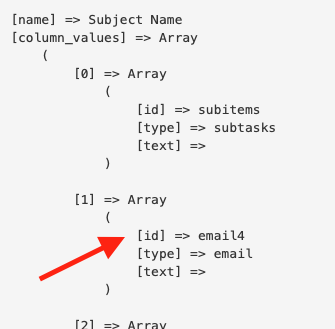
Specifically, I get the below result from above:
{“name”:“Subject Name”,“column_values”:[{“id”:“subitems”,“type”:“subtasks”,“text”:“”},{“id”:“email4”,“type”:“email”,“text”:“”},{“id”:“text8”,“type”:“text”,“text”:“”},{“id”:“long_text”,“type”:“long-text”,“text”:“”},{“id”:“person”,“type”:“multiple-person”,“text”:“John Doe”},{“id”:“status”,“type”:“color”,“text”:“New”},{“id”:“time_tracking”,“type”:“duration”,“text”:“1244:02:22”},{“id”:“creation_log”,“type”:“pulse-log”,“text”:“2022-08-22 13:08:10 UTC”},{“id”:“date”,“type”:“date”,“text”:“”},{“id”:“text5”,“type”:“text”,“text”:“”},{“id”:“requestor_email3”,“type”:“text”,“text”:“”},{“id”:“formula9”,“type”:“formula”,“text”:“”},{“id”:“files”,“type”:“file”,“text”:“”},{“id”:“item_id”,“type”:“pulse-id”,“text”:“3dffdf99”},{“id”:“dropdown”,“type”:“dropdown”,“text”:null}]}]}]},“account_id”:dfdfdfd}
I am trying to parse column “email4” from above as shown below but does not work:
foreach($responseContent as $data2)
$fromname6= $data2[‘items’][0][‘email4’];
$fromname6= $data2[data][items][0][‘email4’];
Any help will be appreciated