
Own developed widget in Docs - filter feature

  • December 7, 2021
  • 7 replies
  • 2639 views

Hi,

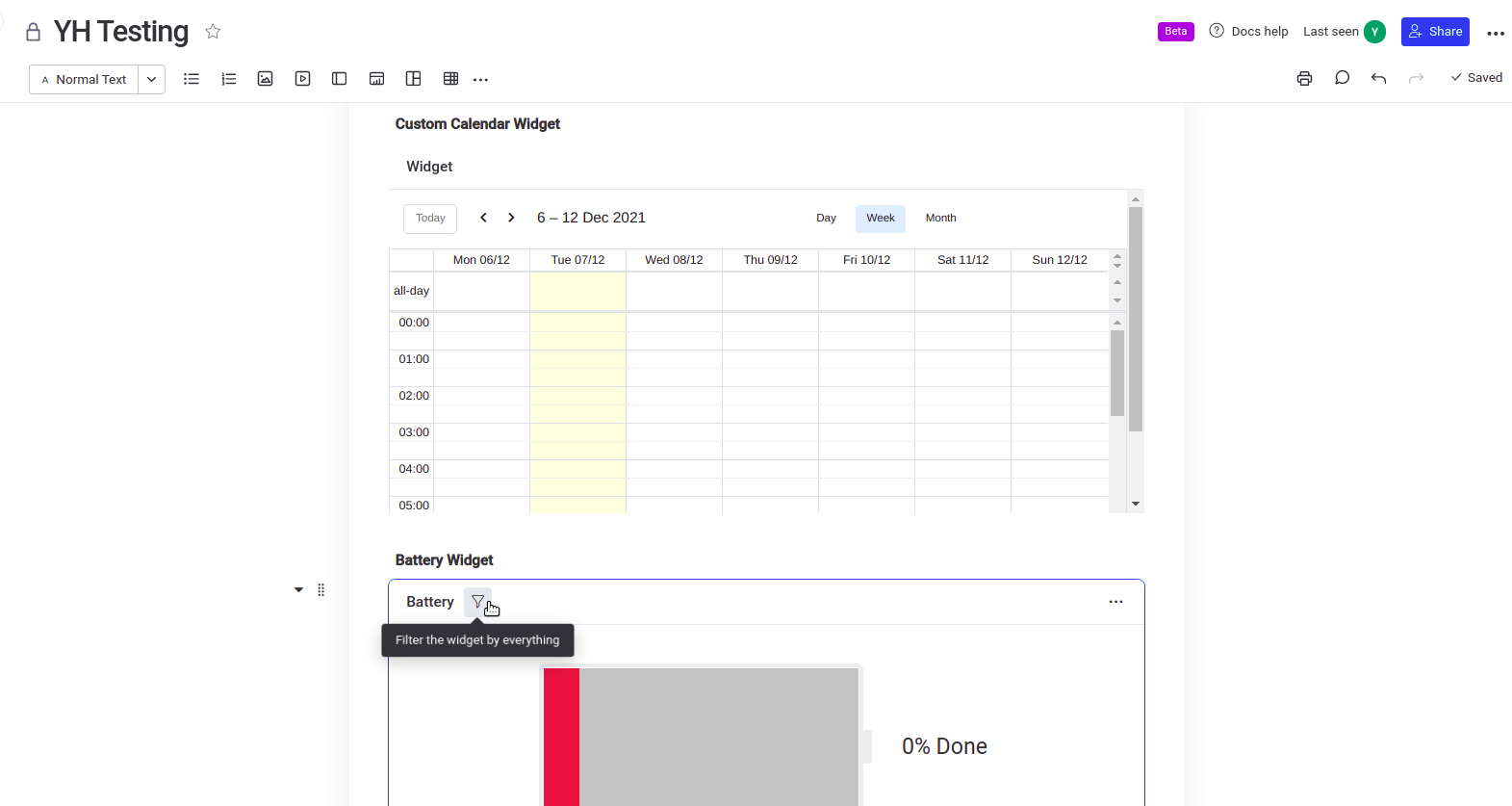
The widgets in the screenshot are added in the Doc.

“Custom Calendar Widget” is our own custom developed widget, I can’t seem to find a way to enable the “Filter” feature in the widget (like the filter shown in Battery Widget), can you please advise on this?

g-company.monday.com
Thanks!

Br YarHuoy

7 replies

Dani
Forum|alt.badge.img
  • monday.com Team Member
  • December 8, 2021

Hi @yarhuoy

Thanks for your question!
As this concerns a Custom built app, I’m going to move your request to the Developer section of the Community.
This is managed by our Developer Success Team who will be able to continue to assist!

Best,

Dani


  • Author
  • Participating Frequently
  • December 9, 2021

Hi @Dani ,

Thanks for your reponse! Is there any update from the team yet? 🙂

Br, YarHuoy


  • Author
  • Participating Frequently
  • December 14, 2021

Hi @Dani

Any update on this? I just want to confirm if the feature is there.

Br, YarHuoy


  • Author
  • Participating Frequently
  • December 21, 2021

Hi,

Any update on this question?

Br, YarHuoy


Matias.Monday
Forum|alt.badge.img
  • monday.com Team Member
  • December 22, 2021

Hello @yarhuoy!

Matias from the Developer Success team here!

Would you be able to send us an email about this issue so we can take a closer look and maybe troubleshoot together? The address is appsupport@monday.com

Looking forward to hearing from you!

Cheers,
-Matias


  • New Participant
  • March 22, 2022

Hello Monday team,

I am having the same issue, I am not sure how to add the filter in my custom dashboard widget as well.

Many thanks in advance,

  • Marcel

Matias.Monday
Forum|alt.badge.img
  • monday.com Team Member
  • March 23, 2022

Hello @marcelmacha and welcome to the community!

I hope you like it here 💪

As of today, we do not support native filtering in widgets. Only in board views.

If you want to build some filtering logic, you will need to implement it on your end.

Hope this answers the question 🙂

Cheers,
Matias

