Question

Node.js version upgrade due to CVE-2026-111497. But can't redeploy to comply.


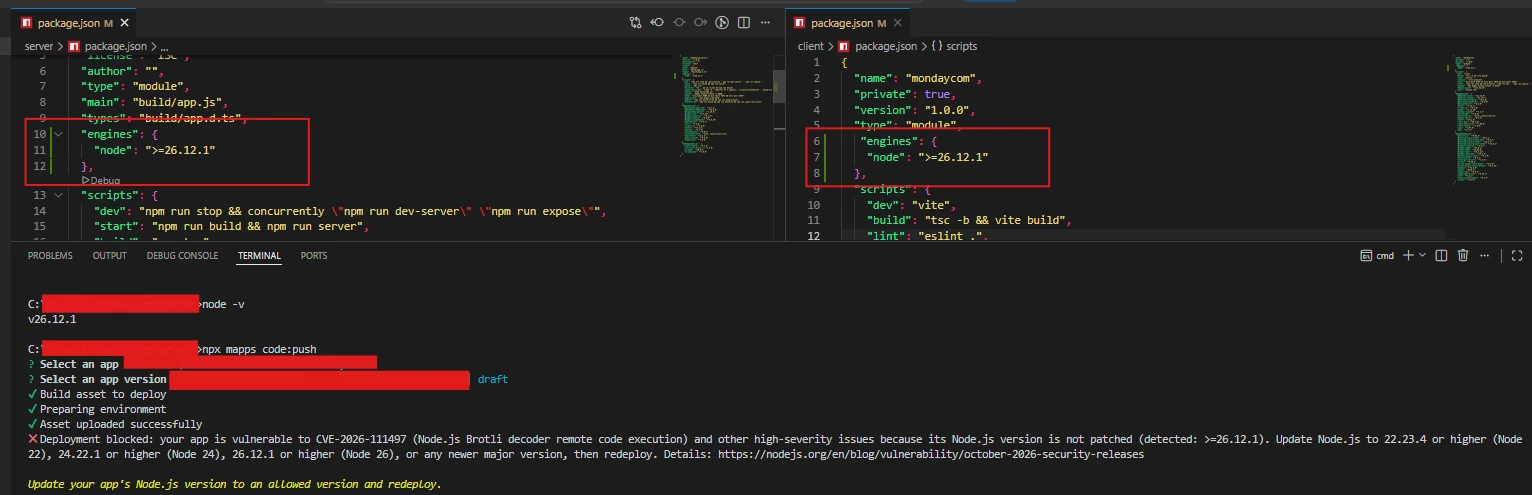
We’ve already upgrade our Node.js version to required versions to comply on the latest security vulnerability issue of Node.js. But upon deployment we can’t deploy our changes. Does someone have same experience? We’re upgrading our app to required version but how we can update it if we can’t deploy right? Screenshot below is our fix and the response on the deployment that always keeps us from deploying our changes. Appreciate it if someone can have a feedback on this.

 

2 replies

dvdsmpsn
Forum|alt.badge.img+1
  • Participating Frequently
  • October 26, 2026

Does this work?

{

  ...

  "engines": {

    "node": "^26.12.1"

  },

  ...

}


  • Author
  • Participating Frequently
  • October 26, 2026

​@dvdsmpsn Thanks for the feedback. 

I was able to deploy now. What I did is remove the “>=” and just apply the version “node”: “26.12.1”. But version 26 is having an error. monday.com response a Node.js installation error so I use version “node”: “24.22.1” and I’m able to deploy now.