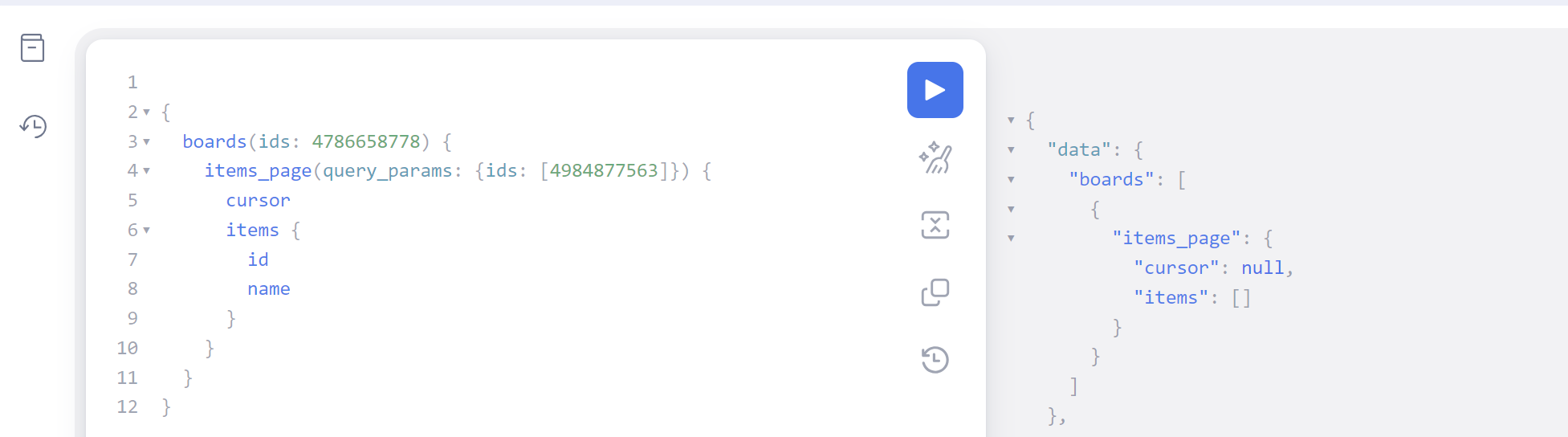

New `items_page` does not accept specified item ids

  • August 14, 2023
  • 11 replies
  • 794 views

kolaai
Forum|alt.badge.img

As shown in the attached image, even though the documentation says the items_page accepts an array of item ids, when added, it throws an error.
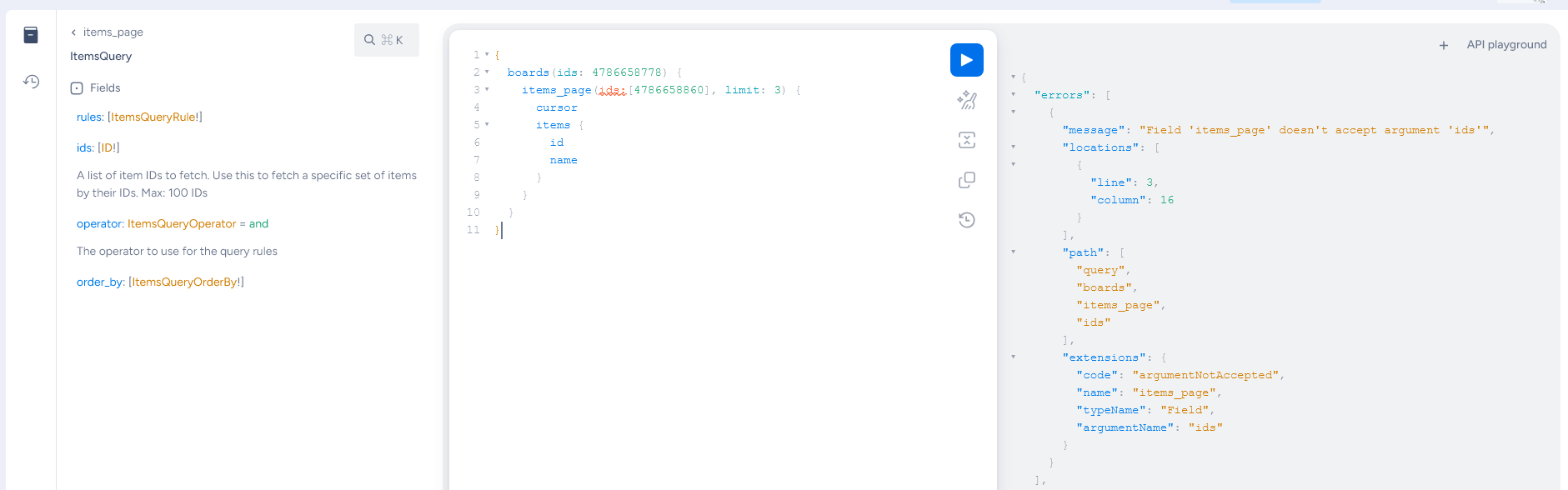
Still on item ids, the new items_page will only work under a boards query which unfortunately is a step backwards from the previous item query where all you needed to know is the item id to get information about the item.
What happens when you have multiple item ids which are located in different boards? Does it mean you will have to query for all the board ids and then in the boards query, include all the board ids?
So in effect, the final query might look like this:

{
  boards(ids: [MULTIPLE_BOARD_IDS_HERE]) {
    items_page(ids:[ITEM_IDS_FROM_THE_DIFFERENT_BOARDS], limit: 3) {
      cursor
      items {
        id
        name
      }
    }
  }
}


11 replies

dipro
Forum|alt.badge.img
  • Leader
  • August 14, 2023

You need to send the item IDs in the query_params argument:

query {
  boards (ids:4579962334) {
    items_page(query_params:{ids:4579963913}) {
      items {
        id
        board {
          id
        }
      }
    }
  }
}

As for why it’s a step backwards; I don’t fully understand. In the previous version you also had to nest the items query inside a boards query. What’s missing?

You do still have the option of returning items by ID directly, using the root items query:

query {
  items (ids:12345) {
    id
  }
}

kolaai
Forum|alt.badge.img
  • Author
  • monday.com Partner
  • August 14, 2023

Hello @dipro,

Thank you for your answer. I did try your answer and I was expecting the item id and name as part of the result but got nothing.

Also, concerning the items query, do I correctly understand that, items can still be used as a root query, provided an id or ids are specified and must not always be nested under the new items_page query?
If yes, what does this part of the documentation mean then?

  1. Queries that use items must nest them in the items_page object

dipro
Forum|alt.badge.img
  • Leader
  • August 14, 2023

Hey, thanks for the quick response.

Regarding the items query – yes, you are correct. You can still use items as a root query.

Regarding the documentation – great catch, I wrote that sentence and realize how it’s unclear/wrong. 🙁 I will update it to the following:

Queries that use items inside the boards or groups object must nest them in the items_page object

Regarding getting no data for the above item – looks like a mistake in your query or a bug. Can you do the following basic troubleshooting and, if it still fails, open a ticket?

  • Check the item and board IDs are accurate
  • Check the logged-in user has access to the items and boards
  • Check that the item has not been deleted/archived
  • Check that the board or group has not been deleted/archived

kolaai
Forum|alt.badge.img
  • Author
  • monday.com Partner
  • August 14, 2023

Hello @dipro,
Thanks for the response and also the troubleshooting ideas. It helped. I had mistakenly used the wrong board id.
Looking forward to the updates in the documentation


dipro
Forum|alt.badge.img
  • Leader
  • August 15, 2023

4 posts were split to a new topic: Trouble using new API version


kolaai
Forum|alt.badge.img
  • Author
  • monday.com Partner
  • August 20, 2023

Hello @dipro,

If I understand correctly, previous queries for groups that looked like this

{
  boards(ids: BOARD_IDS) {
    groups(ids: [GROUP_IDS]) {
        items {
          id
        }
    }
  }
}

should now look like this:

{
  boards(ids: BOARD_IDS) {
    groups(ids: [GROUP_IDS]) {
      items_page {
        cursor
        items {
          id
        }
      }
    }
  }
}

The only problem is, the latter does not work and the api throws an error that "Field 'items_page' doesn't exist on type 'Group'"


Matias.Monday
Forum|alt.badge.img
  • monday.com Team Member
  • August 21, 2023

Hello there @kolaai,

The second query should work now. We had a small issue that was fixed.

I just tested the following query succesfully:

{
  boards(ids: 1234567890) {
    groups(ids: ["topics"]) {
      items_page {
        cursor
        items {
          id
        }
      }
    }
  }
}

Let me know how that goes!

Cheers,
Matias


kolaai
Forum|alt.badge.img
  • Author
  • monday.com Partner
  • August 21, 2023

Alright @Matias.Monday . Thank you 🙂


Matias.Monday
Forum|alt.badge.img
  • monday.com Team Member
  • August 21, 2023

Happy to help @kolaai !


  • New Participant
  • February 29, 2024

Hi Matias,
does this code still works now?

im trying to code in python with the same structure, but it fails

query = { boards(ids: 123456789) { groups(ids:['my_group_id']) { items_page(limit:10) { items {id name} } } } } 

payload = {'query' : query}
r = requests.post(url=api_url, json=payload, headers=headers) # make request

data = r.json()

any help will be so greatful! thank you!


Matias.Monday
Forum|alt.badge.img
  • monday.com Team Member
  • March 7, 2024

Hello there @Celia and welcome to the community!

I hope you like it here 💪

The query itself looks good to me (I would use double quotes instead of simple quotes).

Regarding the Python syntax, I do not have experience with it so I wouldn’t be able to comment on that.

Cheers,
Matias