New development server: Mondaytunnel

  • December 2, 2022
  • 10 replies
  • 2140 views

We’re excited to announce the new monday tunnel!

We’ll be moving away from using ngrok and localtunnel in our applications in favor of our own development server.

What is changing?

When setting up our starter apps, we will expose your local development server with our very own mondaytunnel.

After running your application, you will receive a URL that will look similar to this:

https://white-bullfrog-0.tunnel.monday.app
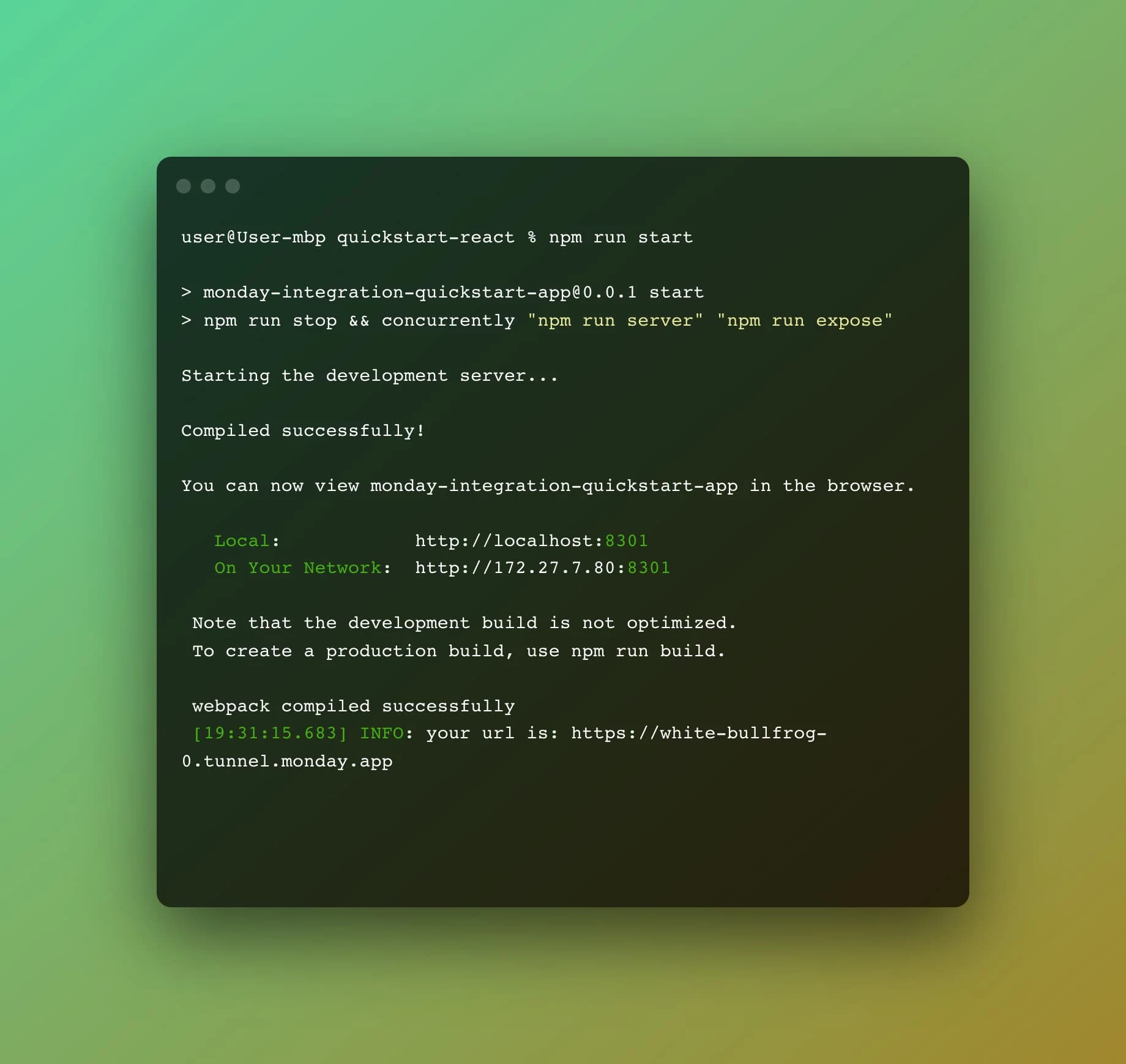
Be sure to check out our example apps in our Integration, Views & Widgets guides.


10 replies

  • New Participant
  • December 28, 2022

Hi Alessandra,

Let me see if I understand this correctly…

This new tunnel URL that is generated should be publicly accessible in the browser? Or is it just a configuration tool for previewing on the apps view in Monday? When I go to the tunnel URL generated by my app, I just get a 504 gateway time-out error. I haven’t added any code to the template yet either.

I am looking for the proper way to develop locally while having access to all the features provided by Monday SDK. As far as I know, localhost cannot replicate the proper app permissions or connections. For example, in localhost I can’t run methods like monday.get().

Any kind of help would be greatly appreciated 🙂


Matias.Monday
Forum|alt.badge.img
  • monday.com Team Member
  • December 28, 2022

Hello @qlee93 and welcome to the community!

I hope you like it here 💪

The tunnel is a tool you can use to expose your local script to the internet. It will provide a URL that you can use to access your project from a browser.

If you are having issue with it, maybe we can jump on a call and take a look together. What do you think? If you want, you can schedule a call here!

Cheers,
Matias


  • New Participant
  • December 28, 2022

@Matias.Monday thanks! I will schedule a call with you~


Matias.Monday
Forum|alt.badge.img
  • monday.com Team Member
  • December 29, 2022

Sounds good @qlee93!


guidou4
  • Participating Frequently
  • January 29, 2023

Hi @qlee93 ,

Was anybody able to solve your issue ?

I’m facing the same: 504 bad gateway timeout. Jus tried the quickstart-react application, no change…

@Matias.Monday, maybe you have a solution ?


Matias.Monday
Forum|alt.badge.img
  • monday.com Team Member
  • January 30, 2023

Hello @guidou4,

After some investigation about the issue of this thread, we concluded in the fact that the issue lied in the environment where the developer was working and it was not related to the monday tunnel.

I recommend you to check your environment (firewall settings for example).

If you can not find the solution, let me know!

Cheers,
Matias


chigup36
  • New Participant
  • March 27, 2023

I tried opening the link in my phone that is also not working same issue 504, can you help?


Matias.Monday
Forum|alt.badge.img
  • monday.com Team Member
  • March 27, 2023

Hello there @chigup36 and welcome to the community!

As explained in this thread, after some investigation about the issue, we concluded that the issue lied in the environment where the developer was working and it was not related to the monday tunnel.

It is very likely for this to be the case. I recommend you to check your environment (firewall settings or an antivirus software for example) to check that nothing in your environment is blocking the tunnel.

Cheers,
Matias


  • New Participant
  • April 11, 2023

Hi, I’m just getting started developing for Monday and I’m getting the same 504 problem mentioned above. Here is a quick workaround:

Workaround:

  1. Setup a personal ngrok account (free)
  2. Clone the quickstart-react repo from Monday and run
npm run start
  1. On your laptop, run
ngrok http 8301
  1. Copy paste the ngork app in as your Custom URL in Monday. You can also pay 10$/month and get a static URL which speeds up your work.

Happy coding!


  • April 12, 2023

Hi @pilotfish,

Thank you for your contribution to our community!