Missing backToUrl for OAuth handling while app installation

  • August 14, 2021
  • 18 replies
  • 2208 views

Hello,
I currently work on the OAuth handling that is triggered when an app is installed. I am using the URL https://auth.monday.com/oauth2/authorize with the client_id of my app and the redirect_uri that should be called after the user has authorized the app. The redirection will then indeed called and I can also request a token with the provided code successfully. However I don’t know how to proceed. The app is not installed after this handling. So I guess I have to call a backToUrl (to monday.com) to finish it.
Does anybody know what is the correct handling here?
Thanks a lot, Marcus

This topic has been closed for replies.

18 replies

Forum|alt.badge.img
  • monday.com Team Member
  • August 16, 2021

Hi @nyxophyl,

I’m curious to learn more about how your app is not installed at that point. If you have access to the user’s access token, your app should indeed be installed on the user’s account.

Additionally, you don’t need to direct the user back to their monday.com accounts in order to complete the OAuth flow. This can all happen in a separate window.

If you want to explain a bit more about what you have set up on your current OAuth flow, maybe I can help spot where the trouble is occurring.


  • Author
  • Participating Frequently
  • August 17, 2021

Hey @Helen I tried again today and the app is not installed, not on my developer account and not on another account which does not own the app. The current app version uses a tunnel URL to test locally. Could this be an issue? At least the redirect_uri is triggered, so I guess it does not matter.
Concretely I try to install the app with the auth URL mentioned above. When the redirect_uri is called after acceptance, I call the URL to get the token, which is successful. I then return 200 to the received response and that’s it. In the end the user sees a blank page with the redirect_uri and the given code and scope returned by monday,.com. Do I miss something?


Forum|alt.badge.img
  • monday.com Team Member
  • August 19, 2021

Hi @nyxophyl,

After you get the token from your redirect_uri, you will need to exchange it for an access token as described in this section of our OAuth documentation: https://apps.developer.monday.com/docs/oauth#token-request.

Is this what you’ve done too? This second step will return the access token that you can then use in your API requests.

Apologies for not being clear before. Let me know if you were able to implement this second step!


  • Author
  • Participating Frequently
  • August 19, 2021

Hi @Helen,

yes, I exchange the code provided to the redirect_uri with an access token and also do a query to monday API to be sure it is valid. All that is successful, but the app is not installed then. The only way I currently can install the app is to provide the client_id and response_type=install to the auth URL, but this bypasses the OAuth handling which seems not to be recommended.


AlexSavchuk
Forum|alt.badge.img
  • monday.com Team Member
  • August 20, 2021

@nyxophyl

That does sound quite odd. Just to make sure we’re on the same page here, are you going through the OAuth process on a live version currently, or on a draft version? I’m wondering if this could be related to the versioning flow.

If you haven’t yet, I’d suggest promoting a Major version to live, and then trying to go through an OAuth process again.

Let us know if that helps!

-ALex


  • Author
  • Participating Frequently
  • August 21, 2021

Hi Alex,
this happens with the latest live major version of the app. I tried again today also with different browsers, no success.


Forum|alt.badge.img
  • monday.com Team Member
  • August 23, 2021

Hi @nyxophyl,

So sorry to see that you’re running into this issue.

At this time I do want to go ahead and start gathering more information for a bug report. Because the report will include some sensitive information, do you mind emailing appsupport@monday.com with the following details?

  1. What is the most recent time (as specific as possible) where you saw this issue?
  2. What is the URL of your app (i.e. the account the app was built in)?
  3. Does this issue occur with other apps in your account as well? Or only this one?
  4. If needed, do you mind granting our developer permission to log into your account for troubleshooting purposes only?
  5. It would be immensely helpful to see a visual of the login flow as a user of your app will experience it. This way, we can see if there are any error messages that pop up for the user.

I know this is a lot of information, but we need to make sure we pass our devs all of it on the first go around, this way we don’t experience any delays.

Thank you so much!


  • Author
  • Participating Frequently
  • August 23, 2021

Hi @Helen I just sent a mail with some information. Let’s see what they say.


Forum|alt.badge.img
  • monday.com Team Member
  • August 23, 2021

Hey @nyxophyl,

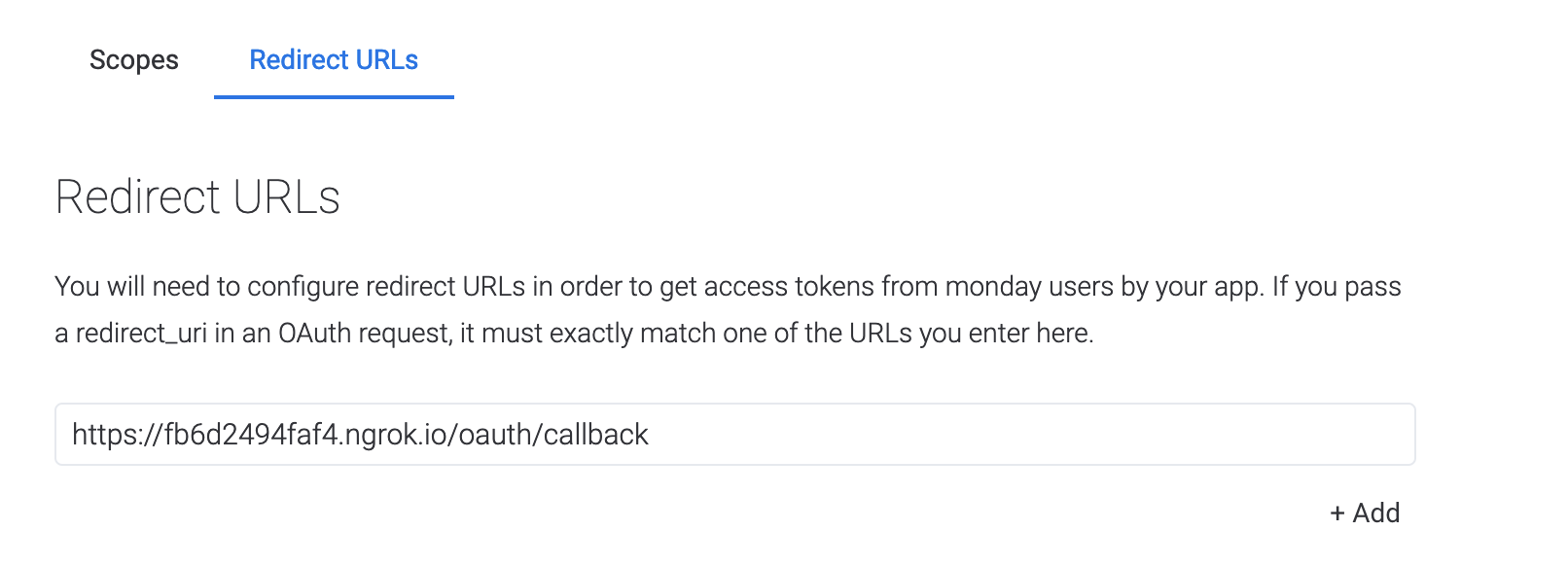
Actually, from your email it looks like your redirect URL doesn’t end in “/oauth/callback”.

Instead of “monday_auth/callback” do you mind changing it to “/oauth/callback”? It shouldn’t be working with a redirect URI ending in “monday_auth/callback”.

Let me know if this works.


  • Author
  • Participating Frequently
  • August 23, 2021

Hi @Helen I see. I currently use the ending /oauth/callback already for the OAuth handling to the 3rd party server. Is it possible to use something like /monday/oauth/callback?


Forum|alt.badge.img
  • monday.com Team Member
  • August 23, 2021

@nyxophyl

Do you mean this URL is using oauth/callback?

Because that’s not what I’m seeing in the logs for your redirect URI:

image


  • Author
  • Participating Frequently
  • August 23, 2021

Hi @Helen correct I mean this URL, which currently is configured and implemented URL ends as /monday_auth/callback, which seems not to work. So my question is, can I configure it as /monday/oauth/callback?


Forum|alt.badge.img
  • monday.com Team Member
  • August 23, 2021

No that sadly won’t work.

So it sounds like this endpoint is being used for the other platform you’re connecting your app to, right? Could that platform take an alternate endpoint?


  • Author
  • Participating Frequently
  • August 23, 2021

I will try tomorrow (it is too late now here in Germany) and will let you know the results.


  • Author
  • Participating Frequently
  • August 24, 2021

Hi @Helen I changed the URL as requested, still no success. I also answered the mail to appsupport.


Forum|alt.badge.img
  • monday.com Team Member
  • August 25, 2021

Hi @nyxophyl, for ease let’s just talk in the email.

I’ll update here once we’ve found a solution!


dipro
Forum|alt.badge.img
  • Leader
  • November 3, 2021

Closing this as we were able to resolve this over an email thread.


  • November 10, 2021

This topic was automatically closed 7 days after the last reply. New replies are no longer allowed.