Issue querying with Google Apps Script

  • September 3, 2020
  • 8 replies
  • 2674 views

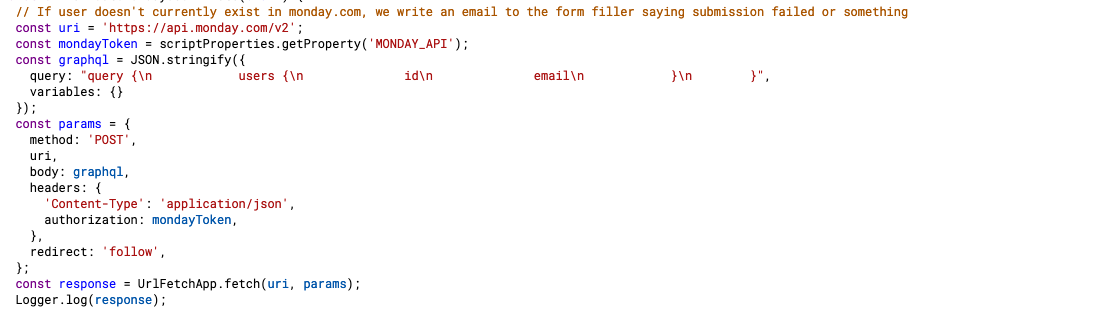
Wondering if there’s anything wrong with my query in trying to pull users from the v2 API or if it’s a Google Apps Script issue. I keep getting “No query string was present” as my response when executing this code.

This topic has been closed for replies.

8 replies

  • Community Expert
  • September 4, 2020

Hey @don-ts ,

in your query you shouldn’t insert the newline command.
You can either write it like this to make it readable:

query { 
  users{
    id
    email
  }     
} 

or just:

query { users{ id email } }

Greetings


dsilva
Forum|alt.badge.img
  • Participating Frequently
  • September 11, 2020

Hey @don-ts - could you try @TMNXT-Dev’s suggestion and let us know if it helped?

Best,
Daniel


  • Author
  • New Participant
  • September 11, 2020

Oh, thanks all for the replies! Sorry for the really late response…

I recently tried both suggestions and they still return that response. The query I initially posted was generated from some site which allows me to test queries and it worked there, but when I copied into Google Apps Script I get that error. Maybe it really is a Google Apps Script issue?

Anyway, the purpose of this is so I can add a new employee’s monday ID into our db, particularly after a new user in our workspace gets created. If there’s a sort of webhook that detects when new users get added onto Monday.com, I’d love to know.


  • Community Expert
  • September 18, 2020

Hey @don-ts,

while I don’t have an answer regarding the webhook, you could try and copy this query:

`query { 
  users(newest_first: true){
    created_at
    id
    email
  }
}`

Greetings


  • Author
  • New Participant
  • September 22, 2020

Figured it out… the query itself wasn’t the issue.

The key “body” was actually supposed to be called “payload” for Google Apps Script.

Again, thanks for your help!


  • Community Expert
  • September 23, 2020

Interesting, thanks for the update 🙂


AlexSavchuk
Forum|alt.badge.img
  • monday.com Team Member
  • September 23, 2020

@don-ts I’m glad you wer e able to tackle this on your own, that’s awesome! Definitely something to keep in mind, I love that share!

-Alex


  • February 25, 2021

This topic was automatically closed 7 days after the last reply. New replies are no longer allowed.