How to pass variable in column_values

  • March 21, 2023
  • 8 replies
  • 1097 views

Hi ,
I have attempted various methods to insert a variable as the value for a column, the “text39” column as shown in the Mutation query below, but I have been unsuccessful so far. Any help on this one

mutation ($myText: String!) {
create_item (
board_id: 415144386,
group_id: “emailed_items12303”,
item_name: “Subject”,
column_values: “{"dropdown99": "7",
"dropdown": "",
"dropdown9": "18",
"text39": " $myText ",
"status4": "0",
"text26": "staff response to",
"additional_info": "This is the addional info",
"text27": "Rec_no"
}”
) {
id
}
}

i have tried "text39": $myText . Didn’t work
tried "text39": ${myText}. Didn’t work .

Doing all this from postman and variable is defined
{
“myText”: “Test text”
}

8 replies

Matias.Monday
Forum|alt.badge.img
  • monday.com Team Member
  • March 21, 2023

Hello there @mbirshad,

I have replied in the ticket we have open.

I also added a solution for your string which includes special characters 🙂


  • New Participant
  • March 24, 2023

Hello Matias,

Where can i find the ticket ?

Thanks


Matias.Monday
Forum|alt.badge.img
  • monday.com Team Member
  • March 26, 2023

Hello there @y-labyed and welcome to the community!

I hope you like it here 💪

The ticket is a private email thread with a user.

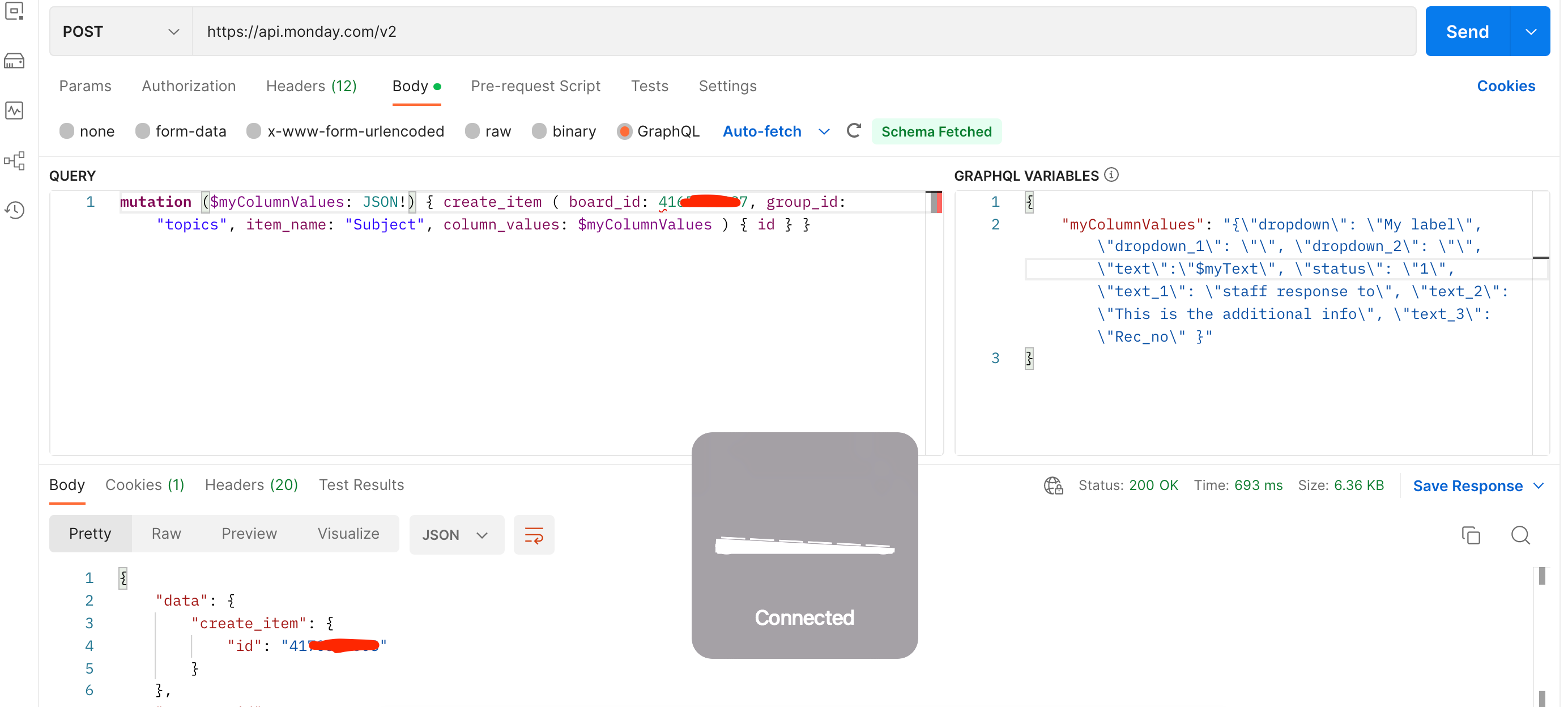
But basically, you should pass the whole column_values as a variable:

You can see a working example here:

Query:
mutation ($myColumnValues: JSON!) { create_item ( board_id: 1234567890, group_id: "topics", item_name: "Subject", column_values: $myColumnValues ) { id } }

Variables:
{
"myColumnValues": "{\\"dropdown\\": \\"My label\\", \\"dropdown_1\\": \\"\\", \\"dropdown_2\\": \\"\\", \\"text\\":\\"My txt\\", \\"status\\": \\"1\\", \\"text_1\\": \\"staff response to\\", \\"text_2\\": \\"This is the additional info\\", \\"text_3\\": \\"Rec_no\\" }"
}

That should do the trick 🙂


  • Author
  • New Participant
  • March 26, 2023

@Matias.Monday and @y-labyed the solution didn’t really solve the issue i was facing i.e. handling special characters (\\t \\r \\n ) . But as per your suggestion @Matias.Monday I have filtered the string first before passing it to the mutation query . That worked .

But I’m still curious that there should be a way of passing the variable to the column directly.

Thanks,


Matias.Monday
Forum|alt.badge.img
  • monday.com Team Member
  • March 27, 2023

Just in case anyone is wondering,

This is the suggestion regarding the special characters:

You could in that case use a regex as explained here.

As an example:

const str = "\\t- Decision making relating to the investigation authorized council staff or the Council itself. ­ \\n\\t-\\n";console.log(str.replace(/[^a-zA-Z ]/g, ""));

The log will show: Decision making relating to the investigation authorized council staff or the Council itself

So, you can use something like this to filter the special characters from your string, and then pass the filtered string to the text column.


  • Participating Frequently
  • March 27, 2023

Thank you mathias,
this trick probably works, but the result is the same for us.
i mean, we wanted as “[mbirshad]” asked, to pass variable directly in the graphQL order and not the value.

But i understand, it’s not possible at the moment !


  • Participating Frequently
  • February 25, 2024

How would you send the board id and group id via variables?

Take the following query:

$query = 'mutation {create_item (board_id: $board_id, group_id: $group_id, item_name: "First Name", column_values: "{ ... valid column values here...} ") {id}}';

I have variables board_id and $group_id set. how can I concetenate the mutation string to include these values so it looks like the following?

$query = 'mutation {create_item (board_id: 12345467890, group_id: "topic", item_name: "First Name", column_values: "{ ... valid column values here...} ") {id}}';

NOTE: if I manually enter the board id and group id, the mutation works perfectly.


Matias.Monday
Forum|alt.badge.img
  • monday.com Team Member
  • February 26, 2024

Hello there @mark.stout,

I think this example might be useful! You can use the </> button in Postman to “translate” the call to whatever language you need 😁

Cheers,
Matias