
How to find docs id's for querying?

  • March 28, 2023
  • 4 replies
  • 614 views

Hi, Im trying to get the contents of a MONDAY_DOC through the monday api.

When querying for an element with a doc in a monday workdoc column the response contains the workdoc as:

{'id': 'meeting_notes',
'text': 'https://xxx.monday.com/docs/4215703239',
'title': 'Descripccion',
'value': '{"files":[{"name":"Descripccion","fileId":"3267629f-3238-5671-0ab3-96151724245f","isImage":"false","fileType":"MONDAY_DOC","objectId":4215703239,"createdAt":1680010727352,"createdBy":"12345678","linkToFile":"https://xxx.monday.com/docs/4215703239"}]}'}

yet when I try to use the objectID on the docs query { docs (ids:4215703239) { id object_id blocks { id type content } } } it returns an empty list of docs, but when crating the workdoc on the monday dashboard it displays a diferent document id wich will return the contents of the doc properly.
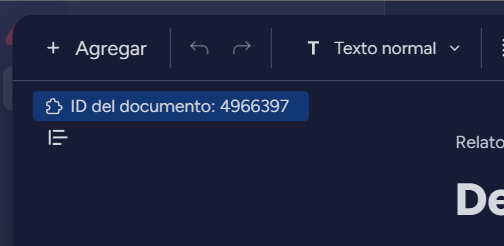
Captura

How can I get this id from the API ?

4 replies

Matias.Monday
Forum|alt.badge.img
  • monday.com Team Member
  • March 29, 2023

Hello there @jhong and welcome to the community!

I hope you like it here 💪

I will speak with our team and check this for you.

I will reply as soon as I hear back from them 🙂

Cheers,
Matias


Matias.Monday
Forum|alt.badge.img
  • monday.com Team Member
  • March 29, 2023

Hello again @jhong,

You can use a query like this one:

{
  docs(object_ids:1234567890){
    id
    doc_kind
    name
    blocks{
      type
      content
    }
  }
}

This ID is the one you can get from querying the information as you did and also the one you see in the address bar of your browser.

Let me know if you have any other questions 🙂

Cheers,
Matias


  • Author
  • New Participant
  • April 3, 2023

Just what I needed, thanks.


Matias.Monday
Forum|alt.badge.img
  • monday.com Team Member
  • April 4, 2023

Glad to hear that @jhong!

If you have any other questions, let me know 🙂

Cheers,
Matias
