
File Column - Clear All 500 error

  • February 18, 2021
  • 9 replies
  • 1273 views

  • Participating Frequently

Anyone else having any issues clearing a file column?

I’m using the correct syntax but keep getting a 500 error, bot via my app and the monday playground. If I use an incorrect item_id or board_id I correctly get a 404. The 500 seems to only happen when the request is correct.

Example:

mutation($board_id: Int!, $item_id: Int!, $column_id: String!, $value: JSON!) { 
  change_column_value(board_id: $board_id, item_id: $item_id, column_id: $column_id, value: $value) {
    id 
  } 
}

vars:

    {
      "board_id":10XXXXXX,
      "item_id":10XXXXXX,
      "column_id":"my_file_column",
      "value":"{\\"clear_all\\": true}"
    }

Any ideas?

FYI - I’m trying to clear a file column on a sub item.
This topic has been closed for replies.

9 replies

  • Community Expert
  • February 18, 2021

Hey @adam.s ,

Change

mutation($board_id: Int!, $item_id: Int!, $column_id: String!, $value: JSON!) { 
  change_column_value(board_id: $board_id, item_id: $item_id, column_id: $column_id, value: $value) {
    id 
  } 
}

to

mutation change_column_value($board_id: Int!, $item_id: Int!, $column_id: String!, $value: JSON!) { 
  change_column_value(board_id: $board_id, item_id: $item_id, column_id: $column_id, value: $value) {
    id 
  } 
}

Maybe that already helps.

Greetings


  • Author
  • Participating Frequently
  • February 18, 2021

Same error unfortunately. I’ve also tried using the update_multiple_column_values to see if that works but it gives the same 500 error. There’s no graphql error returned either, the response is the ‘We’re currently experiencing some technical issues which our developers are working hard to resolve.’


  • Community Expert
  • February 18, 2021

Could your try your variables as following:

{ 
  variables: { 
     board_id: 10XXXXXX, 
     item_id: 10XXXXXX,
     column_id : "my_file_column", 
     value: "{\\"clear_all\\": true}" 
  }
}

  • Author
  • Participating Frequently
  • February 18, 2021

That’s not valid variables structure. It doesn’t run the mutation in that format.


  • Community Expert
  • February 18, 2021

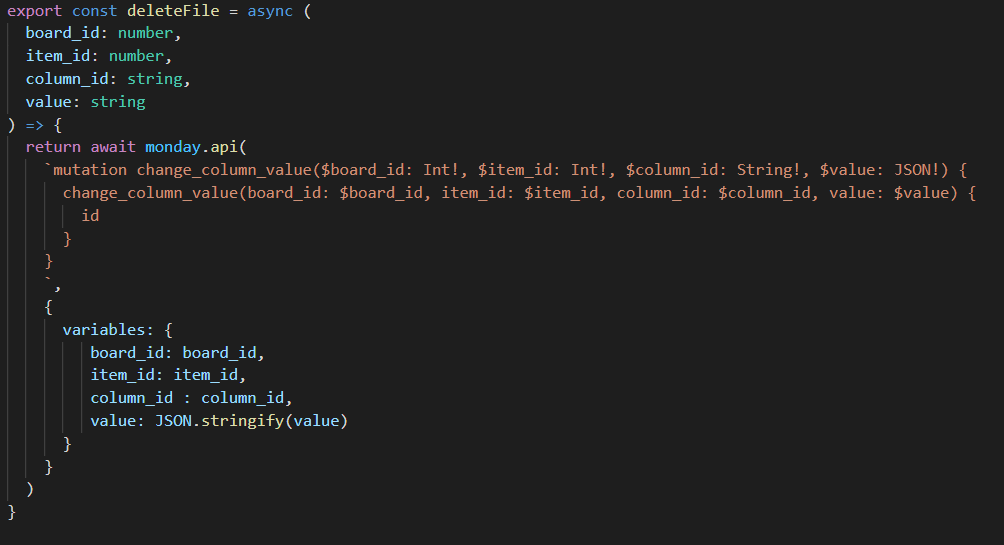
Alright, so I made a quick sample which works.

When you use it in an App don’t forget to set permissions.


  • Author
  • Participating Frequently
  • February 18, 2021

I’m not using the node library. But doing it in the Monday API Playground. It doesn’t work.
I’ve integrated all sorts of functionality without issue. Just this one call.

Thank you for your responses though


  • Author
  • Participating Frequently
  • February 18, 2021

Could it be that clear_all doesn’t work on sub items?


Forum|alt.badge.img
  • monday.com Team Member
  • February 18, 2021

Hi @adam.s!

I tested this out and you can indeed clear a Files column for a Subitem using this method.

Just make sure you’re using the correct Subitem Id and board Id that the Subitem sits on (these will be different than your parent item board Id and parent item Ids).

Let me know if this still doesn’t work for you.

-Helen


  • March 3, 2021

This topic was automatically closed 7 days after the last reply. New replies are no longer allowed.
