
"Error Codes" fields are not returned by GraphQL query

  • August 28, 2022
  • 12 replies
  • 2487 views

rob
Forum|alt.badge.img
  • monday.com Partner

Hi all,
do you know if this article about Error Codes is up to date?

monday API docs

As far as I can see I don’t receive any error_code, status_code, error_message or error_data fields, but a simple errors array containing a message field.

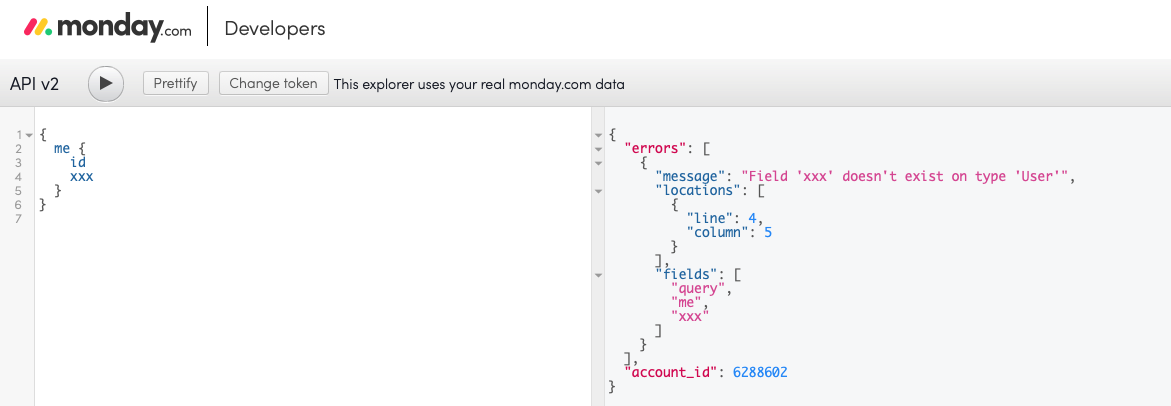
For example, triggering an error on purpose by calling a non-existing xxx field, I get the following errors array:

Array
(
  [0] => stdClass Object
  (
    [message] => Field 'xxx' doesn't exist on type 'Query'
    [locations] => Array
    (
      [0] => stdClass Object
      (
        [line] => 1
        [column] => 129
      )
    )
    [fields] => Array
    (
      [0] => query
      [1] => xxx
    )
  )
)

Do you know how to get the fields mentioned in the article?
Thanks.

12 replies

rob
Forum|alt.badge.img
  • Author
  • monday.com Partner
  • August 29, 2022

@dipro @VladMonday Any feedback? Thanks.


Matias.Monday
Forum|alt.badge.img
  • monday.com Team Member
  • August 30, 2022

Hello @rob!

Which query did you use to get that message you showed there?


kolaai
Forum|alt.badge.img
  • monday.com Partner
  • August 30, 2022

What I have realized is that, even though monday.com does send these error_code , status_code , error_message or error_data fields, they are not catchable making them essentially useless.
If you open your console and check the network tab, you might see these error fields.
I thought it was only on my end but since @rob is also reporting the issue, it seems that it might be a general problem


rob
Forum|alt.badge.img
  • Author
  • monday.com Partner
  • August 30, 2022

Just a simple

{
  me {
    id
    xxx
  }
}

Or any other queries containing an error.

I couldn’t even get the errors above by triggering the error on purpose using the API Playground.


rob
Forum|alt.badge.img
  • Author
  • monday.com Partner
  • August 30, 2022

Also triggering another error, like the complexity exhausted, with a query like this:

{
  boards {
    items {
      id
      subitems {
        id
      }
    }
  }
}

I get the following response:

{
  "errors": [
    {
      "message": "Query has complexity of 25275260, which exceeds max complexity of 5000000"
    }
  ],
  "account_id": 123
}

So I don’t get the ComplexityException as written in the article at Error codes.

Any feedback from monday devs?


rob
Forum|alt.badge.img
  • Author
  • monday.com Partner
  • September 1, 2022

Any update on this @Matias.Monday ?


Matias.Monday
Forum|alt.badge.img
  • monday.com Team Member
  • September 4, 2022

Hello again @rob!

We will take a look into the documentation and change what needs to be changed.

Thank you for the feedback!

Cheers,
Matias


rob
Forum|alt.badge.img
  • Author
  • monday.com Partner
  • September 5, 2022

In addition, I’ve noticed that if you try to change a column value using an invalid item ID or board ID

mutation {
  change_simple_column_value(item_id: 123, board_id: 456, column_id: "date4", value: "") {
    id
  }
}

You get a

{
  "error_message": "Internal server error",
  "status_code": 500
}

While if you use an invalid column ID

mutation {
  change_simple_column_value(item_id: 3184567637, board_id: 3184567625, column_id: "xxx", value: "") {
    id
  }
}

You get the expected error

{
  "error_code": "InvalidColumnIdException",
  "status_code": 200,
  "error_message": "invalid column id xxx, please check our API documentation for the correct data structure for this column. https://api.developer.monday.com/docs/change-column-values",
  "error_data": {
    "column_id": {
      "column_value": "",
      "column_id": "xxx"
    },
    "error_reason": "store.monday.automation.error.missing_column"
  }
}

Please fix it.


  • Participating Frequently
  • September 5, 2022

@Matias.Monday

I’d also add that the “error_code” “error_message”, “error_data” objects are non-standard for GraphQL errors.

GraphQL standard is a “data” object with data and “errors” object with error data. “errors” objects have the following shape:

{
    "errors": [{
        "message": "string",
        "extensions":{ "key1":"string", "key2":"string"}
    }]
}

The Apollo Client (GraphQL) can be configured to throw an exception on on the payload having an errors object. This way Apollo Client (or Apollo Link) will handle a 200 with an errors object as an exception.

However Apollo does not look for the non-standard “error_codes” field in the response as that is not part of the GraphQL spec. You’re then required check your response object for “error_code” and/or lack of a “data” object and throw an exception yourself.

The “errors” object should be used for any errors related to an actual operation - such as column_id not existing on a board, item_id missing, etc.

Apollo Client error handling unfortunately the server-side SDK does not use Apollo Client (though Apollo Link work with some setup, rather than the SDK).

I would highly encourage the monday.com team to move all API errors that are caught (invalid column id xxx) as part of the “errors” object. However, i acknowledge the difficulty of this, especially if client side (web ui) code does not have exception handling for these errors in place.


Matias.Monday
Forum|alt.badge.img
  • monday.com Team Member
  • September 6, 2022

Hello y’all!

Thank you for the feedback and suggestions.

I will share all of this with the team 🙂

Cheers,
Matias


  • Participating Frequently
  • January 17, 2023

Hi @Matias.Monday, is any update available on this issue?

A reliable method for parsing and handling errors is an important requirement for any production application. The docs remain incorrect, and the error codes defined there are not returned. Thanks.


Matias.Monday
Forum|alt.badge.img
  • monday.com Team Member
  • January 18, 2023

Hello there,

I do not have an update yet from our R&D team about this.

I will speak with them again and send again the feedback about the documentation so we can take a look into it.

Cheers,
Matias