


monday.com has a very unusual implementation of timezones and time offsets, so this is a knowledge sharing excercise, for lack of any documentation that explains things.
A developer recently mentioned the following:
Why api return different dates for rollup column and the non-rollup column ? It seems to me that the rollup column returns the date in UTC, while the regular one uses the user's time zone. Is this intentional?
Having had to work out whats going on, I thought I’d put something down about whats happening.
So what happens when a user with user settings and browser locale set to Europe/London sets a date/time of 7 Jul, 01:00 (UK/24h time) in a column using the monday.com UI?
Take the following graphql query:
{
  me {
    time_zone_identifier
    utc_hours_diff
  }
  items (ids:12060200220){
    column_values (types: [date]){
      id
      text
      value
      ...on DateValue {
        date
        time
      }
    }
  }
}
We get an output of:
{
  "data": {
    "me": {
      "time_zone_identifier": "Europe/London",
      "utc_hours_diff": 1
    },
    "items": [
      {
        "column_values": [
          {
            "id": "date4",
            "text": "2026-07-07 01:00",
            "value": "{\"date\":\"2026-07-07\",\"time\":\"00:00:00\",\"changed_at\":\"2026-07-07T11:33:53.666Z\"}",
            "date": "2026-07-07",
            "time": "01:00"
          }
        ]
      }
    ]
  },
  ...
}
What we can see from the data:
- the user has
"utc_hours_diff": 1 - the text, date & time in the data are all in local time for the user
- the value contains a JSON string with the date & time in UTC+0
We can assume the the following is happening In the monday.com UI
- the column gets the date/time from the
...on DateValueexpansion - but I’m guessing that the rollup (from the original question) gets the date/time from the
valuestring.
What gets really weird is the following situations:
Swap the user settings to Pacific/Honolulu (UTC-10), but leave the browser locale alone
The data from the same query gives this:
{
  "data": {
    "me": {
      "time_zone_identifier": "Pacific/Honolulu",
      "utc_hours_diff": -10
    },
    "items": [
      {
        "column_values": [
          {
            "id": "date4",
            "text": "2026-07-06 14:00",
            "value": "{\"date\":\"2026-07-07\",\"time\":\"00:00:00\",\"changed_at\":\"2026-07-07T11:33:53.666Z\"}",
            "date": "2026-07-06",
            "time": "14:00"
          }
        ]
      }
    ]
  },
  ...
}
What we can see from the data:
- the user has
"utc_hours_diff": -10 - the text, date & time in the data are all in local time for the user (the day before at 14:00h)
- the value contains a JSON string with the date & time in UTC+0
So what is displayed in the column in the monday.com UI?
- Nothing has changed
- It’s still
7 Jul, 01:00(UK/24h time)
Keep the user settings at Pacific/Honolulu (UTC-10), but swap the browser locale to Pacific/Honolulu (UTC-10)
How do we fix this for the user who want’s to see their date/times in local Honolulu / UTC-10 time?
- Install a browser extension such as Change Timezone for Google Chrome
- Set the timezone to Pacific/Honolulu in the browser extension
- Reload the page
Here’s what you’ll get:
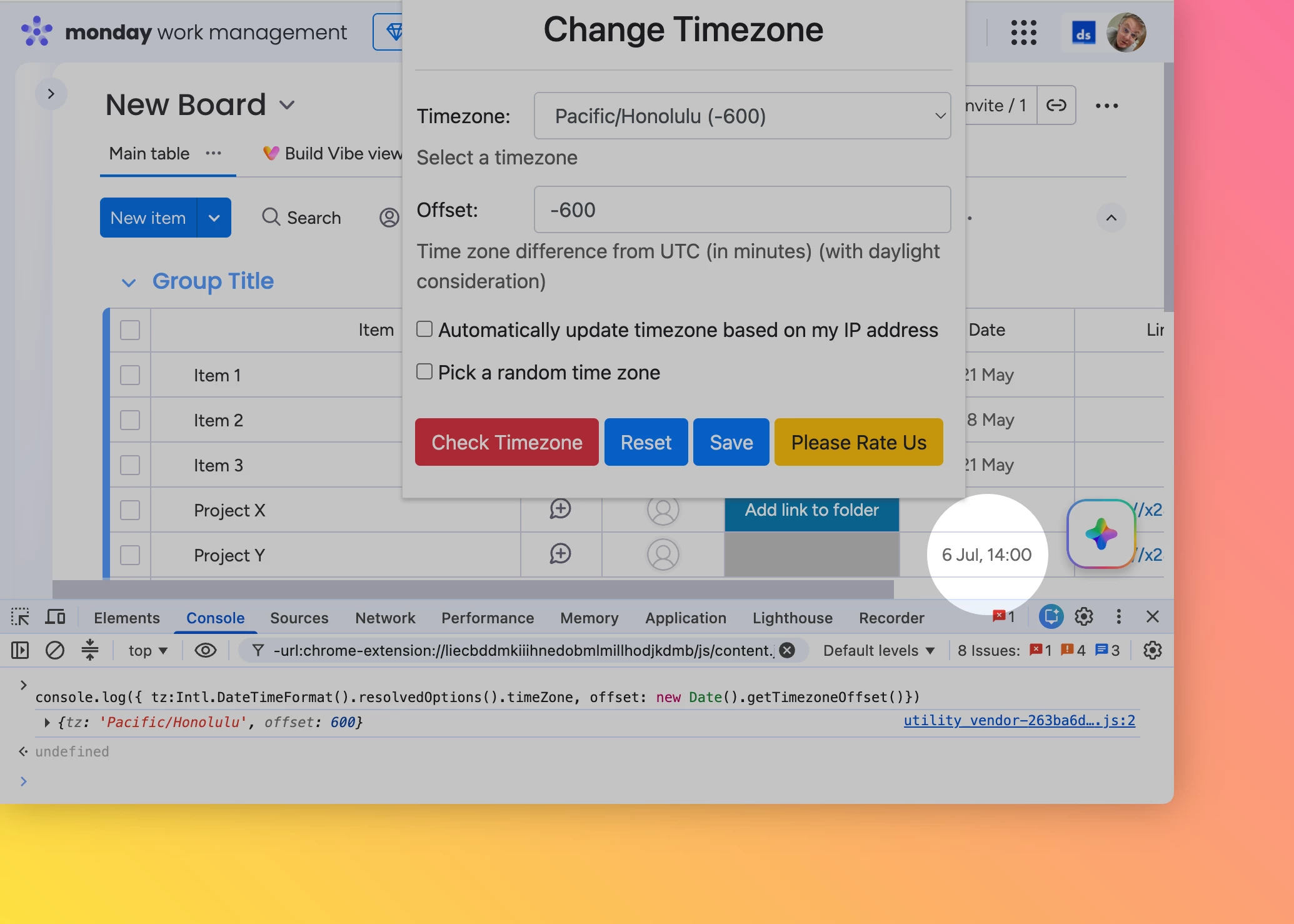
You can see that the date and time are now appropriate for the user’s settings, but they’ve had to install a browser extension to get the actual desired effect.
⚠️ This is the wrong behaviour and requires attention from monday.com engineering.
Swap the user settings back to Europe/London (UTC+1), but keep the browser locale at Pacific/Honolulu UTC-10
In this situation
- the data from the graphQL query is reverted to the original
- the monday.com UI keeps the Pacific/Honolulu (UTC-10) value to be displayed.
⚠️ Again, this is the wrong behaviour and requires attention from monday.com engineering.