Custom Action Code Example

  • June 21, 2022
  • 21 replies
  • 2459 views

  • Participating Frequently

Does anybody have an hosted javascript example of some simple code for developing a custom action along with the appropriate definitions of the feature?

21 replies

  • Author
  • Participating Frequently
  • August 5, 2022

OK, let’s simply this by breaking it down into smaller code snippets. I want to provide the challenge-response thru pipedream.com action using node js - anybody have a snippet of code?


Matias.Monday
Forum|alt.badge.img
  • monday.com Team Member
  • August 7, 2022

Hello there @Randy!

When you talk about the “challenge”, are you referring to sending back to monday the challenge you get from the triggering of a webhook?

Looking forward to hearing from you 🙂

Cheers,
Matias


  • Author
  • Participating Frequently
  • August 7, 2022

Yes, that’s exactly what I would like to see in Node JS code.


  • Author
  • Participating Frequently
  • August 9, 2022

Here is my action snippet on pipedream’s webhook (but note that I get failed to communicate when I try Monday’s webhooks to that pipedream workflow when trying to connect):

import { axios } from “@pipedream/platform”
async (event,steps) => {
const { challenge } = event.body.hub
$respond({
url: ‘https://api.monday.com/v2’,
headers: { Authorization: ${this.monday.$auth.api_key} },
status: 200,
body: { challenge }
})
}


Matias.Monday
Forum|alt.badge.img
  • monday.com Team Member
  • August 11, 2022

Hello again @Randy!

Here is my example for an endpoint for a webhook:

import express from "express";
import http from "http";
import bodyParser from "body-parser";

const app = express();
const server = http.createServer(app);
app.use(bodyParser.json());


app.post("/", function(req, res) { 
    console.log(JSON.stringify(req.body, 0, 2));    
    res.status(200).send(req.body);
    }
)

server.listen(process.env.PORT || 3000, function() {
	console.log('Express server listening on port 3000.');
})

You can choose not to use the console.log

Hope it helps!

Cheers,
Matias


  • Author
  • Participating Frequently
  • August 11, 2022

Hi Matias, Thanks so much for the reply. I’m using Visual Studio with Node JS project and get "site can’t be reached.

I’ve tried it for port 3000 (as in your example) and also port 1337 which is the localhost/port when running from VS.

When I look at Developer Tools (in Chrome) network tab, I get ‘Referrer Policy: strict-origin-when-cross-origin’

Any further help from you would greatly be appreciated.


Matias.Monday
Forum|alt.badge.img
  • monday.com Team Member
  • August 14, 2022

Hello @Randy!

Can you please follow the steps of the video we have in this article?

This is an example of how to use webhooks with the example code in a repository for you to use.

Let me know what happens!

Cheers,
Matias


  • Author
  • Participating Frequently
  • August 18, 2022

Thanks for the info, however I am unclear as to “example code in a repository”


  • August 18, 2022

Hi @Randy!

The example code we refer to here is where the webhook endpoint code snippet lives. Check out our example code here: GitHub - yuhgto/webhooktester: Simple node application to test webhooks.

Let me know if that helps!


  • Author
  • Participating Frequently
  • August 18, 2022

OK, I’ve got the challenge response working, now how do I add a GraphQL mutate step?


  • August 19, 2022

@Randy,

How to add the GraphQL mutate step will depend on the event you want to subscribe to.

Here is a list of events you can subscribe to and the corresponding mutation name:

  • When a new update is posted - create_update
  • When any column changes - change_column_value
  • When an item is created - create_item
  • When an item’s name changes - change_name
  • When a column changes - change_specific_column_value
  • When a sub-item is created - create_subitem
  • When any sub-item column changes - change_subitem_column_value
  • When a sub-item name changes - change_subitem_name
  • When an update is posted in sub-items - create_subitem_update
  • When an item is deleted - item_deleted
  • When a sub-item is deleted - subitem_deleted
  • When an item is archived - item_archived
  • When a sub-item is archived - subitem_archived

Here is an example of the mutation needed to subscribe to the event “When a column changes”:

mutation {
    create_webhook (board_id: 1234567, url: "https://www.webhooks.my-webhook/test", event: change_specific_column_value, config: "{\\"columnId\\": \\"status\\"}") {
        id
        board_id
    }
}

See more on creating a webhook here: https://api.developer.monday.com/docs/webhooks-1#create-a-webhook


  • Author
  • Participating Frequently
  • August 22, 2022

Somehow I must be missing the “big picture.” I have successfully with C# (and Visual Studio) got the challenge response working as a HttpHandler as follows:
using System;
using System.Collections.Generic;
using System.IO;
using System.Linq;
using System.Web;

namespace Monday_Integration
{
public class Handler1 : IHttpHandler
{
string body = String.Empty;
public void ProcessRequest(HttpContext context)
{
context.Response.ContentType = “text/plain”;
//context.Response.Write(“Hello World”);
using (var inputStream = new StreamReader(context.Request.InputStream))
{
body = inputStream.ReadToEnd();
}
context.Response.Write(body);
context.Response.StatusCode = 200;
}

    public bool IsReusable
    {
        get
        {
            return false;
        }
    }
}

}

My problem is where / how to place a GraphQL mutation?


  • August 22, 2022

Hi @Randy

You can select the webhook of your choice in the integrations page within your monday board.

Follow the guide below (which is also here) to set up your webhook:

How to create a new Webhook

Step 1

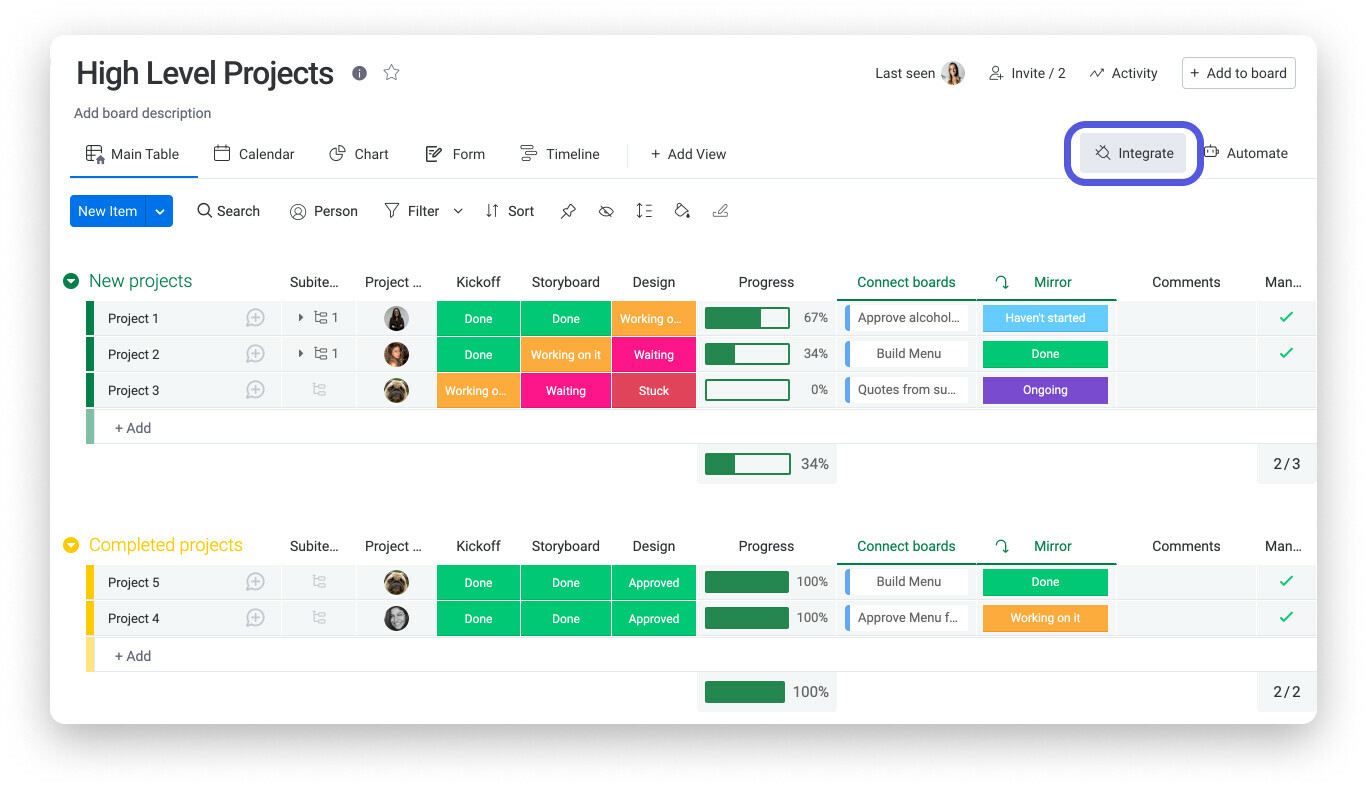
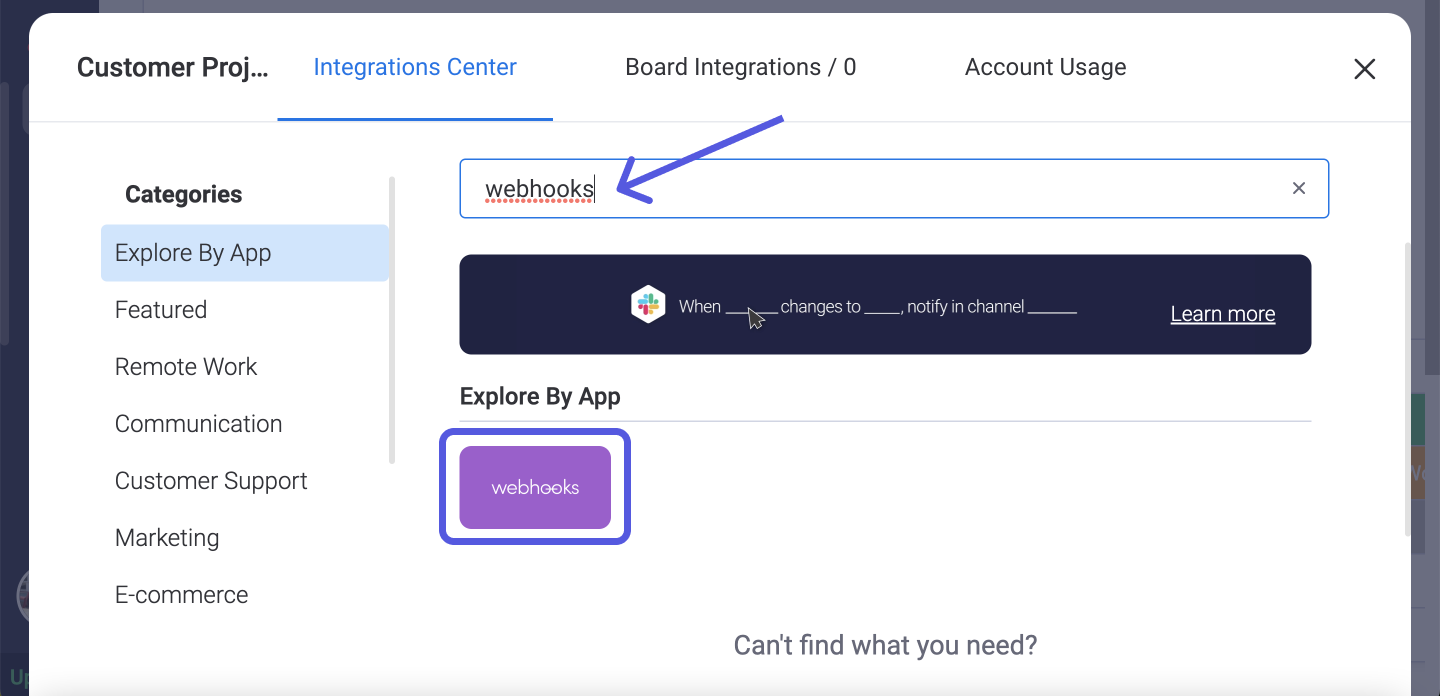
On your board, click the “Integrations” icon and look for the “Webhooks” app in the Integrations Center.

Once in the Integrations Center, search and click on Webhooks as shown below:

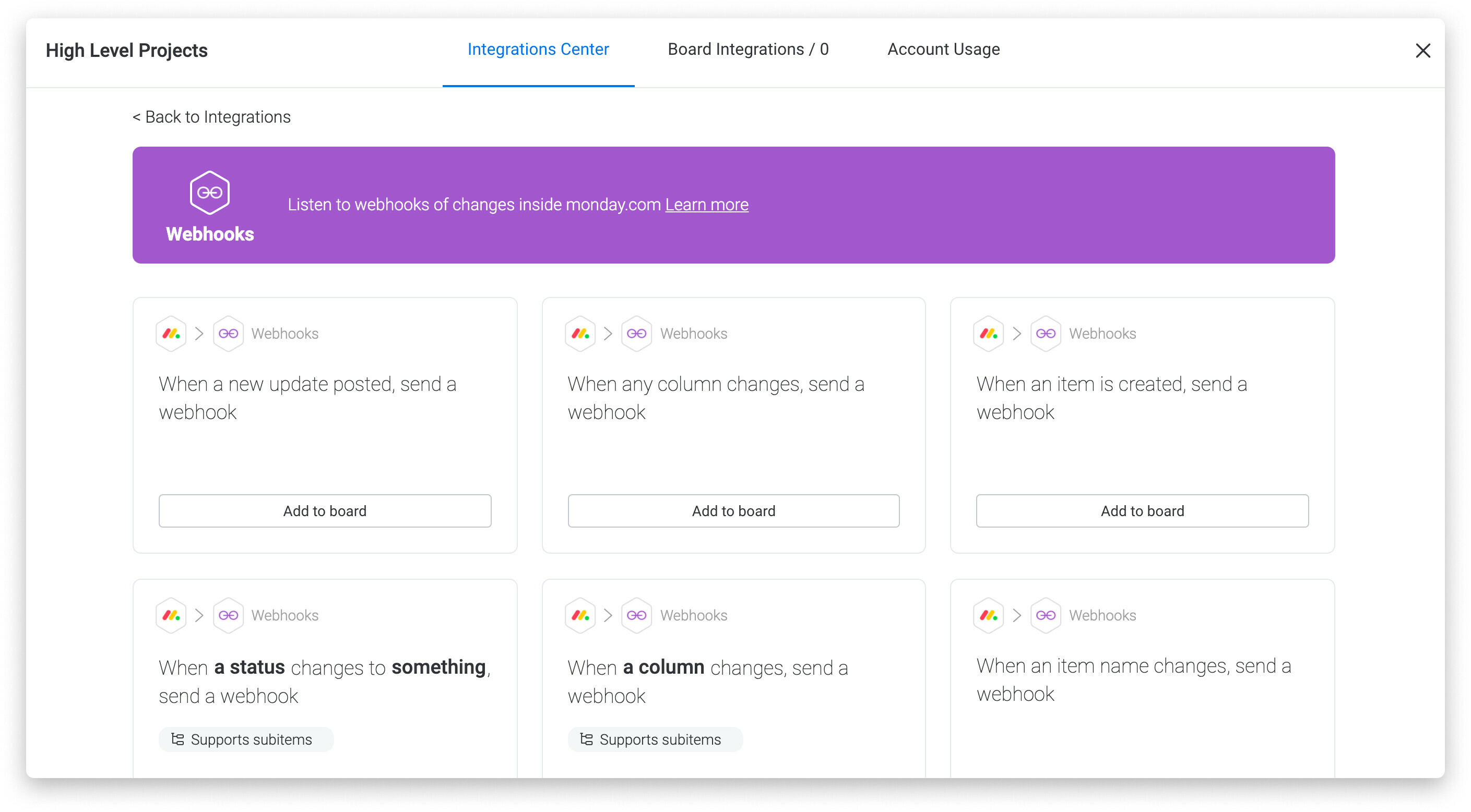
Step 2

Choose the action you want to get instant payloads about:

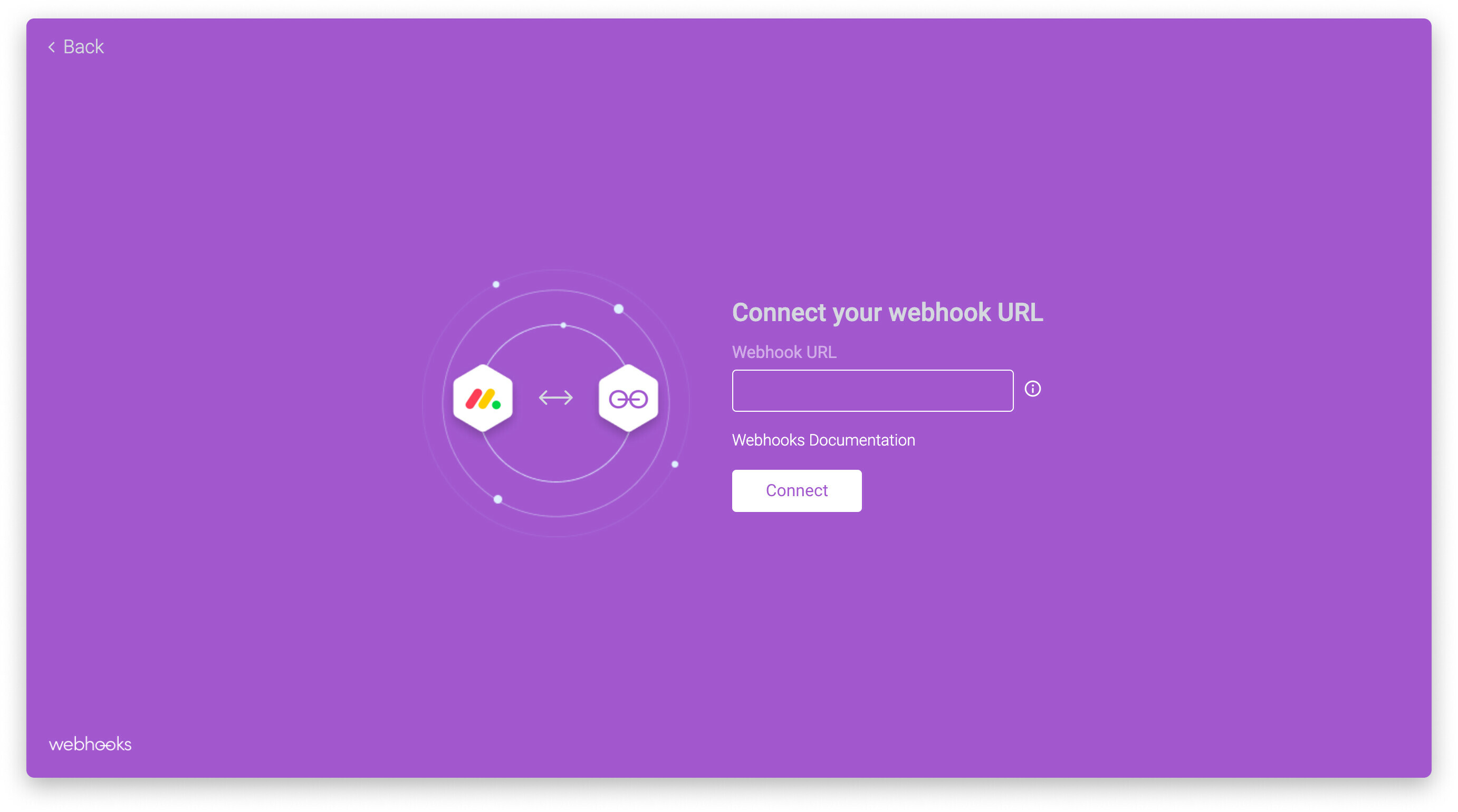
Step 3

After choosing the action you need, you will need to specify the URL. This should be a URL that can pass the JSON challenge back, and it will be the receiver of the payloads moving forward:

And that’s it! As soon as this change will happen, for example, a new item is added to your board, your endpoint will get a payload about the change.

To see this bigger picture in action, please check out this video by Matias for a walkthrough of the setup: monday.com Webhooks - YouTube

Please let me know if this is helpful 🙂


  • Author
  • Participating Frequently
  • August 24, 2022

Switching gears (languages from C# to node JS), I can’t get the following working from either my WinHost server or using a ngrok tunnel:
exports.handler = async event => {
console.log( {“challenge”: JSON.parse(event.body).challenge});
const response = {
statusCode: 200,
body: event.body

};
console.log(response);
return response;
};

That example was copied from a working version, so there must be something wrong at a higher level?


  • August 25, 2022

Hi @Randy!

Are you seeing any errors when running this code? if so, could you please share any errors you’re seeing?


  • Author
  • Participating Frequently
  • August 25, 2022

Yes, when trying to connect using webhooks, I get: Failed to communicate with URL provided.


Matias.Monday
Forum|alt.badge.img
  • monday.com Team Member
  • August 28, 2022

Hello there @Randy!

That error message means that either your server is not running (the endpoint is not reachable) or that you are not returning the challenge correctly (exactly as it is sent to your endpoint).

Can you please schedule a call with use here so we can take a look into it together?

Cheers,
Matias


  • Author
  • Participating Frequently
  • September 12, 2022

I’ve got my nodejs Webhooks code working with ngrok, but executing that same code on my WinHost server I get 'failed to communicate when trying to connect integration. Note:

  1. my dedicate server is not https (just http), does that make a difference?
  2. my app.listen uses const port = process.env.port || 3000; is that a problem?
  3. does my app.listen need something for address?

Matias.Monday
Forum|alt.badge.img
  • monday.com Team Member
  • September 13, 2022

Hello again,

  1. HTTP should not be an issue here.

2 and 3. I don’t think that is an issue. This is a function I use:

server.listen(process.env.PORT || 3000, function() {

console.log('Express server listening on port 3000.');

})

I believe there is an issue with WinHost. It is either that the endpoint is not accessible or that the endpoint is not sending the challenge back in the exact same way it is received.


  • Author
  • Participating Frequently
  • September 16, 2022

Finally got it working with WinHost, I had 2 problems:

  1. The web.config rewrite weren’t right, so I removed them completely
  2. I was doing a GET ‘/’ and POST ‘/’ which I changed to GET ‘’ and POST '
    Thanks for all of your help. I never could have done it without you.

Matias.Monday
Forum|alt.badge.img
  • monday.com Team Member
  • September 18, 2022

I am glad it works!! 🙂