Custom action cannot be applied to new items

  • January 15, 2025
  • 6 replies
  • 72 views

cdeely

I have built an app which exposes a recipe and custom Action. I am able to use the recipe to react to changes on an existing item, but I cannot figure out how to use it for new items. I have selected ‘enable for publish’ on my action, but it does not appear in the custom automation screen.

I tried to build a custom recipe, but there is no way for me to map a column input from that trigger.

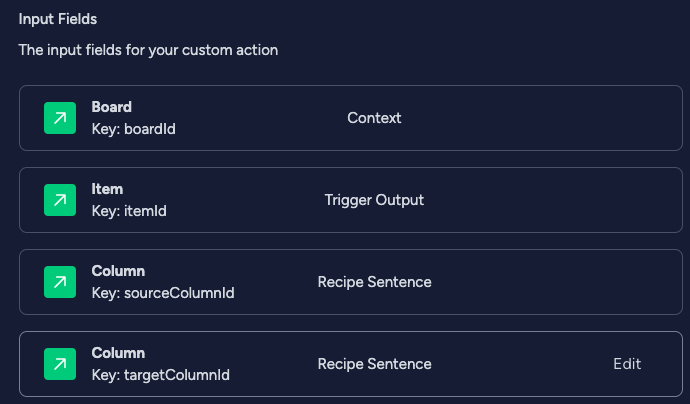
Here is the definition of my inputs:
Any help would be greatly appreciated!

6 replies

basdebruin
  • Community Expert
  • January 15, 2025

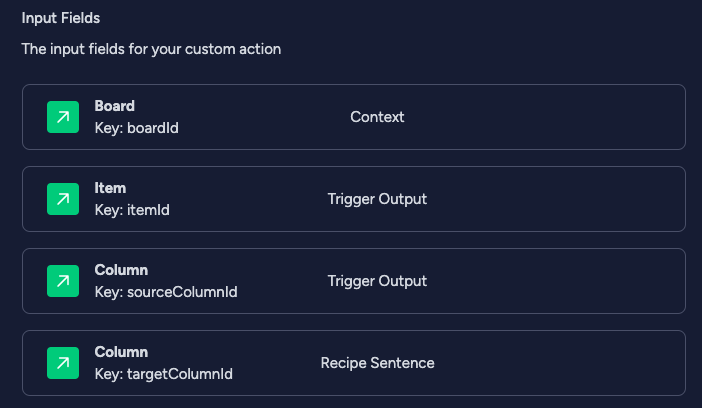
I think it is because the item creation trigger does not have a solumnId in it’s trigger output. Your custom action expects sourceColumnId to be present, but that isn’t the case on an item creation trigger.


cdeely
  • Author
  • New Participant
  • January 16, 2025

Thanks, @basdebruin, that makes sense, but is there any way to allow this action to be used during item creation?

Building a custom automation doesn’t seem to allow any kind of sentence creation where I can ask the user to select additional inputs. Do i need to also create a custom trigger?


basdebruin
  • Community Expert
  • January 16, 2025

If the above screenshot is showing all your input fields I guess a standard trigger “When column changes” would work as that trigger send the columnId as it’s output, along with the required itemId).


cdeely
  • Author
  • New Participant
  • January 16, 2025

Yes, a column change trigger can be used, however that leaves me high and dry for item creation. Specifically, my use case is for handling items added to a board via a Form. The form includes the requester’s email address which I want to use to look up additional account information and update the item with the details.

It seems I cannot build a recipe which allows the user to say “When an item is created, update column X using the email address in column Y”. Or, really, do anything on item creation if I need more context than just the item itself.

Custom triggers seem to be designed around changing items based on external events, which is not right for this scenario.

Maybe it is possible to design my action to respond to item creation but use hard-coded column names to drive the updates? I am new to the Monday API, and the trigger output appears to deliver column IDs - can an item’s columns be retrieved by name?

Even so, that feels like a hack and will be non-obvious to users of the app. Simply renaming a column would break the integration.


basdebruin
  • Community Expert
  • January 16, 2025

But if you want “When an item is created, update column X using the email address in column Y”, you could simply ask the user for both column X and Y in the action part sentence. Just change sourceColumnId to com from the Recipe Sentence.


cdeely
  • Author
  • New Participant
  • January 17, 2025

You’re a life saver! Switching the column input to being sourced from the recipe sentence let’s me leverage the action in custom automations and custom recipes! (after publishing a new app version)

This was a real mental hurdle for me - I was not groking how the trigger output and recipe sentence features worked.

Thank you!