CORS issue when uploading file with API v2

  • August 12, 2020
  • 10 replies
  • 12454 views

Hey there !

I am currently working on an app using Angular + Firebase.
When an user submit a form from the app, an item is created in a board (already did it and it works well).
I want to allow the users to add files in the form, so I need to be able to upload those files in the item in Monday.

I tried to do it the following way:

var file = this.filesList[0]
var itemId = myItemID;

var headers = new HttpHeaders({'authorization': environment.monday_token});
var option = {headers : headers}
var url = "https://api.monday.com/v2/file"; 

//The gql query
var addFileRequest = {"query" : "mutation($file: File!, $itemId: Int!, $columnId: String!)\\
{add_file_to_column(file:$file, item_id: $itemId, column_id: $columnId) \\
{ id }\\
}",
"variables" : {"file" : file, "itemId":itemId, "columnId":"file"}}

this.httpClient.post(url,addFileRequest, option).subscribe((snapshot:any) => {
      console.log(snapshot);
 });

When I execute the code above I got the logs in the browser console:
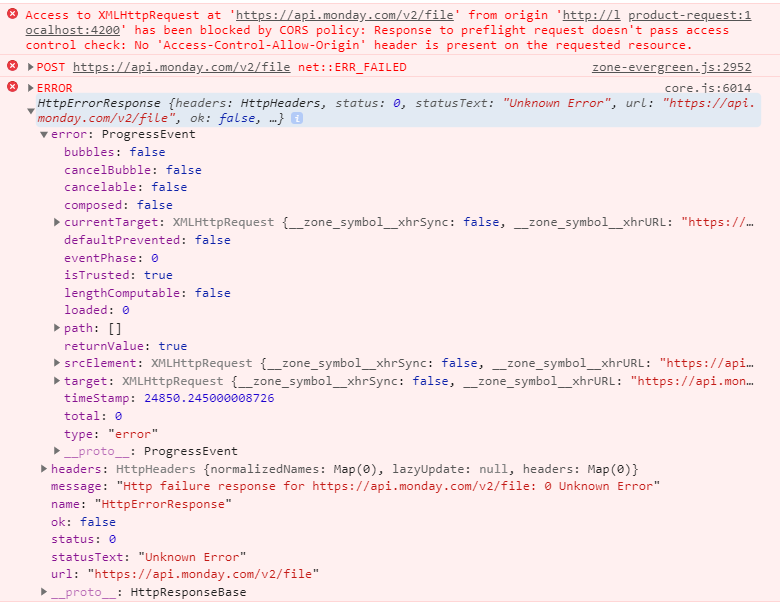
I’ve seen in others Topics that CORS issue happens when you’re trying to upload a file from client-side. So what are my others options here ? How could I proceed to avoid it then ?

Thank you for your help 🙂

This topic has been closed for replies.

10 replies

dsilva
Forum|alt.badge.img
  • Participating Frequently
  • August 12, 2020

Hey @Joren - welcome to the community!

Let me check in with the team on this - I’ll post again when I hear back from them.

-Danny


  • Participating Frequently
  • August 13, 2020

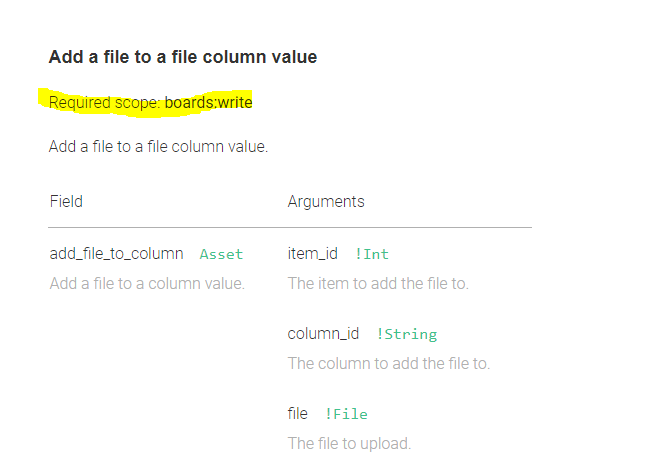
I hope you have the required permission set

image


pepperaddict
  • Participating Frequently
  • August 13, 2020

Hello,
I just wanted to say that I’m facing the same issue with cors.
I’ve enabled all the scopes and I’m sending it almost exactly the same as OP except my origin is from ngrok’s https.

I have a question, will file upload work for Monday’s SDK monday.api()? I know that the endpoint is different from the rest which is probably why I get a 500 error.


  • Author
  • New Participant
  • August 13, 2020

I don’t know, I haven’t set any permission, but I already got few API calls working (like writting on boards, posting updates, changing column values) so it feels like this scope it’s allowed by default ?


AlexSavchuk
Forum|alt.badge.img
  • monday.com Team Member
  • August 13, 2020

Hey there @pepperaddict and @Joren,

This is something we are checking over with the developers on our end as well, but I wanted to also point you to this thread that covers a similar issue:
Request blocked by CORS

As soon as we get further input from our team, we will share any details that might help you solve this for success 🙂

-Alex


pepperaddict
  • Participating Frequently
  • August 13, 2020

Hey @AlexSavchuk !

Thanks!
I’m not sure if this info is handy or not, but I thought I’d share it anyway.
I decided to give it a go in Postman and wasn’t able to send a file to this endpoint: https://api.monday.com/v2/file (via the documentation) I received a 500 error

BUT I was able to successfully send a file to https://api.monday/v2/

i tried to mimic postman’s steps to my post request in the frontend, but I still received the cors problem.

edit:
Well, according to this post, I wonder if there is a known limitation to uploading via client side which is where OP is using Angular and I’m using React.


AlexSavchuk
Forum|alt.badge.img
  • monday.com Team Member
  • August 14, 2020

Hey fellow spicy food lover @pepperaddict

As far as I understand from talking with the technical team on this, and it doesn’t seem like we have active CORS restrictions in place. I am not quite sure what might be causing this for the /files/ endpoint, to be transparent, and I will discuss this further with our team. I appreciate your insight and extra info to what is happening on your end - every little bit of info helps 🙂

-Alex

Moderator edit: you can now upload files from the client-side using the monday SDK. Here’s an announcement on how to do it: Quick update: you can now upload a file from the client-side using the monday SDK. Check out this announcement for more information: Announcement: Uploading files to monday.com has just become easier :)


  • Author
  • New Participant
  • August 14, 2020

I did try to use Postman with api v2 and v2/file to upload a file and it was a success for both of them.

Trying to use v2 instead of apiV2/file in my application resulted as an error 500 and I still have the CORS error with the v2/file API


pepperaddict
  • Participating Frequently
  • August 18, 2020

Hey @Joren

Any update?

I managed to get it to work with a published build to bypass the cors issue only for the /v2/ endpoint (/v2/file still has cors issue 😦 ).
If you want to go this route, I wrote up how to do it here: [Released] File upload via Monday's SDK client side - #3 by pepperaddict


  • Author
  • New Participant
  • August 24, 2020

Hello @pepperaddict

Nothing new from my side, I didn’t have time lately to work on it. I’ll try your solution and let you know then. Thank you !