Change people 500 error

  • August 4, 2020
  • 5 replies
  • 1435 views

Hello, I am having the same issue as here : API v2 - change people column error 500 - #5 by scumbletest

But while no one answers my questions, I am trying with a new thread hoping someone will stop-by here 😉

Issue: Mutation for column value change with people column type returns a 500 issue.

Here is my code:
{

“query”: "mutation {\\n change_column_value(board_id: 657972484, item_id: 627338655, column_id: “person”, value: "{“personsAndTeams”:[{“id”:11161799,“kind”:“person”}]} “) {\\n id\\n} }”

}

Thanks in advance for your help,

This topic has been closed for replies.

5 replies

JCorrell
Forum|alt.badge.img
  • Community Expert
  • August 4, 2020

@tomgoirand

The 500 errors are not very helpful. Almost anything being off will throw them. Double check id numbers. Make sure the column type is “people” NOT “person”. Also, looks like you are using at least 2 different types of quote characters.

This worked for me:

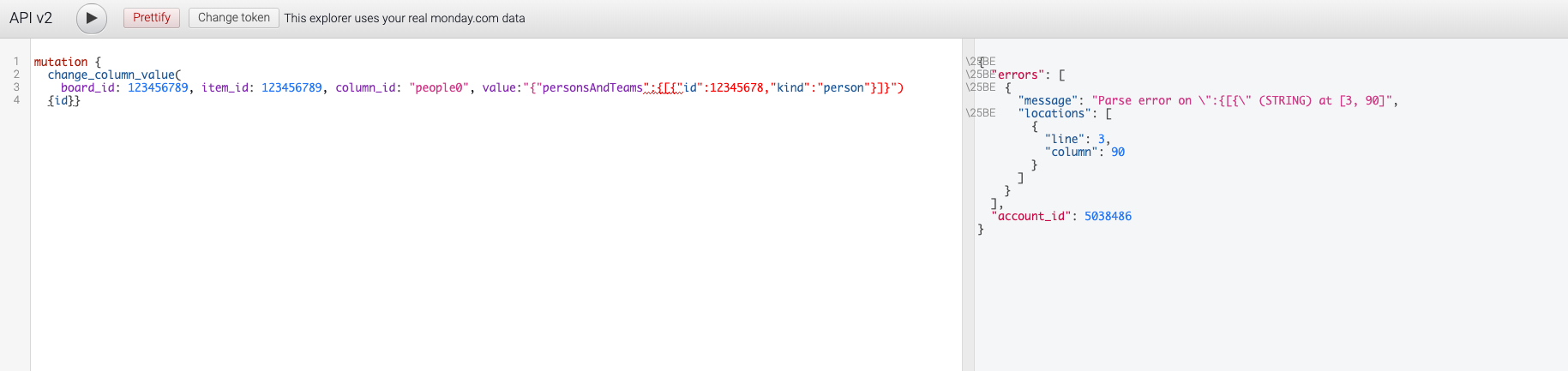
mutation { change_column_value(board_id: 123456789, item_id: 123456789, column_id: “people0”, value: “{“personsAndTeams”:[{“id”:12345678,“kind”:“person”}]}”) { id } }


  • Author
  • Participating Frequently
  • August 4, 2020

Damn! Parse error for me in GraphQL query with your code.


AlexSavchuk
Forum|alt.badge.img
  • monday.com Team Member
  • August 4, 2020

Hi there @tomgoirand and @JCorrell! 👋

Alex here for you 🙂 Sorry for a bit of delay before we were able to get back to you with a solution!

Here is a query I’ve just tried setting up within my account, and it seems to have worked correctly on the Try It Yourself page:

mutation {
change_column_value (board_id:490621030, item_id:490621055, column_id:“person”, value: “{“personsAndTeams”:[{“id”:9603417,“kind”:“person”}]}”)
{id}}

It seems to me like your JSON formatting might be off, or the values you are trying to send aren’t matching your account data. I was stuck with the 500 server error as well until I noticed the User ID wasn’t matching a User ID in my account. Some tips and pointers to make sure you get this right:

  • Make sure your Board ID, Item ID and User ID is correct;
  • Make sure your JSON string is escaped correctly;
  • Make sure that you are sending the mutation wrapped in a query if you are not on the try-it-yourself page;

Let me know if this helps 🙂

-Alex


JCorrell
Forum|alt.badge.img
  • Community Expert
  • August 4, 2020

@tomgoirand,

You will have to change all of the numbers to what works in YOUR account. Also, I just noticed that what I pasted is NOT what is showing in the post… the “internal” ‘\\’ marks and type of quotation marks are important… try this (with the numbers replaced):

mutation {  change_column_value(board_id: 123456789, item_id: 123456789, column_id: "jc_people0", value: "{\\"personsAndTeams\\":[{\\"id\\":12345678,\\"kind\\":\\"person\\"}]}") {id}}

  • Author
  • Participating Frequently
  • August 4, 2020

Thanks @JCorrell
Now it works! Forgot the “” indeed!