Can't get any data from items_by_column_values

  • November 8, 2021
  • 9 replies
  • 2068 views

gordan

Hi 👋
I know it has to be something obvious, and that it’s my fault but for the life of me I can’t get items_by_column_values to return any items. I’m using the API explorer and this is my query:

{
  items_by_column_values(board_id: 266640420, column_id: "link3", column_value: "helpscout", state: all, column_type: "link") {
    id
    name
  }
}

I’ve checked the board id, and column id and data a hundred times 😦 And that same query on monday.com returns tens of items.

Thank you!

edit: just to be clear, I’m not getting any errors but an empty data set:

{
  "data": {
    "items_by_column_values": []
  },
  "account_id": 4243510
}

This topic has been closed for replies.

9 replies

basdebruin
  • Community Expert
  • November 8, 2021

Hi @gordan

Welcome to the community. What is the column type of column with the id “link3”? If that is a mirror column I am afraid you can’t do a items_by_column_values on a mirror column. Remember that the data does not “live” on that board but somewhere else. Just to make sure it is working as expected you can change the boardId and columnId to the board and column that is actually holding the data.

Hope this does make sense.


gordan
  • Author
  • New Participant
  • November 8, 2021

hi @basdebruin
thank you for your super fast response

it’s just a plain link column 😦 as plain as they get. Visible to everybody.


basdebruin
  • Community Expert
  • November 8, 2021

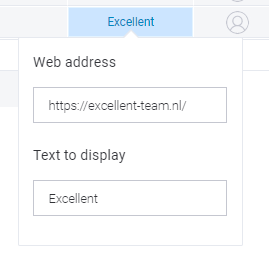
A link column as in?:
image

I am able to get the items with an items_by_column_values using the text to display part, not by using the web address. It looks like this is “by design”.


gordan
  • Author
  • New Participant
  • November 8, 2021

Correct that kind of link.
I made sure that web address and text to display are the same. Still no luck 😦

If I use this
{ boards (ids: 266640420 ) { items () { id state name column_values { id value } } } }

I get the item I need as the first one and it has this for that link field:

   {
                "id": "link",
                "value": "{\\"url\\":\\"https://yehiweb.com/best-free-live-chat-plugins/\\",\\"text\\":\\"https://yehiweb.com/best-free-live-chat-plugins/\\"}"
              },

but when I search for “yehiweb” I get nothing with items_by_column_values 😦


gordan
  • Author
  • New Participant
  • November 8, 2021

I figured it out. It matches exactly full field value 😦
That’s really not usefull. Are there any wildcards available like * or %?


basdebruin
  • Community Expert
  • November 8, 2021

I wish it would support wildcards 😦. The same is true for searching items by a text column, only full (case sensitive) matches are returned.


gordan
  • Author
  • New Participant
  • November 8, 2021

At least we got to the bottom of it 🙂
Thank you so much for your help!


AlexSavchuk
Forum|alt.badge.img
  • monday.com Team Member
  • November 8, 2021

Hey @gordan,

I’m afraid I can only confirm what @basdebruin has mentioned here. Only cases when the value is an exact and case-sensitive match will be returned.

I agree it would be a massive improvement to the monday.com API to handle wildcards for this query, but in the meantime, I can only recommend querying for all results in the board, and then filtering through the data. Otherwise, if you are sending items to monday.com via API, you could include some tagging system by using Status columns, for example, to hold the source of the data.

I hope this helps, and I’m glad Bas was able to shed more light on this.

-Alex


  • November 15, 2021

This topic was automatically closed 7 days after the last reply. New replies are no longer allowed.