App framework input trigger stopped working

  • September 9, 2020
  • 25 replies
  • 2669 views

jeromeskiply

Hi there 👋🏼
Since today, the “Create Item Trigger” stopped working.
One of our app is using it, and it does not send any data anymore.
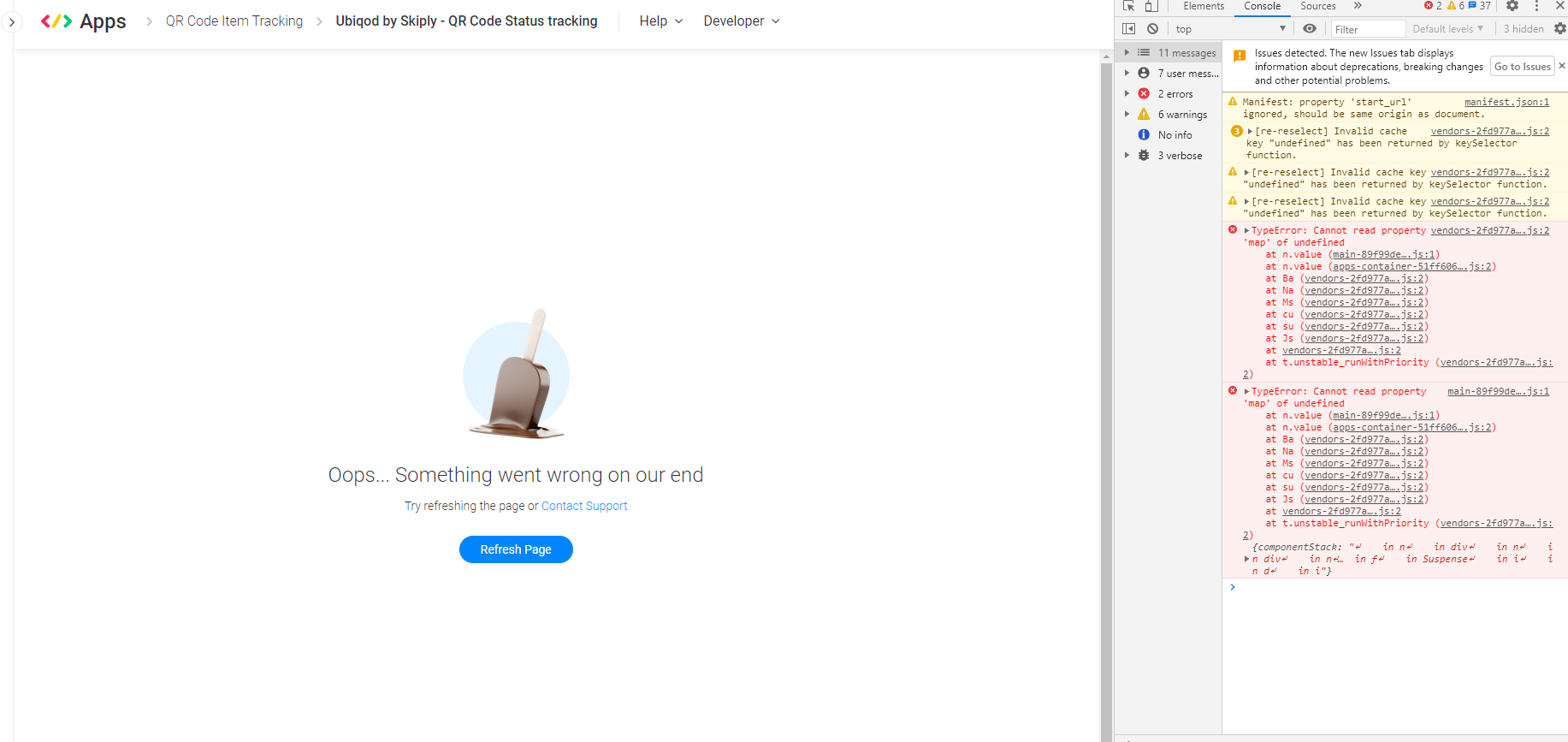
When I try to access the input trigger in the app framework, here is the result: App framework bug - YouTube
It was running very well this morning, we didn’t touch anything on our side.
Any help is welcome…

This topic has been closed for replies.

25 replies

jeromeskiply
  • Author
  • Participating Frequently
  • September 9, 2020

I just checked with other recipes: the problem happens to any kind of input trigger.
Even when I’m trying to create a new recipe, I get an error.

[EDIT]: we received data, but with after very long delay


jeromeskiply
  • Author
  • Participating Frequently
  • September 9, 2020

I got an answer from the support. The fix is ongoing.


basdebruin
  • Community Expert
  • September 9, 2020

Hi @jeromeskiply

Did support give you a time frame for resolution? I experienced the same with all my apps, including the production ons where people paid money for. Moreover the monday status page says “All systems up”.


jeromeskiply
  • Author
  • Participating Frequently
  • September 9, 2020

Hi @basdebruin,
No resolution time frame for the moment…
They say there are downtimes in relation with the automation system.


jeromeskiply
  • Author
  • Participating Frequently
  • September 9, 2020

@basdebruin the automation issue seems to be solved (https://twitter.com/mondaydotstatus/status/1303713018350501890), but I still can’t edit an input trigger (my first video link).


basdebruin
  • Community Expert
  • September 9, 2020

@jeromeskiply

Exactly the same here. Triggers work again, but I can’t edit the recipe in an app that contains a custom trigger


dsilva
Forum|alt.badge.img
  • Participating Frequently
  • September 9, 2020

Hey @jeromeskiply & @basdebruin,

The automation issue should now be resolved - please let us know if you’re still seeing it occur.

As for the issues with the apps (in particular editing the recipe) - I’ve gone ahead and pinged the dev team on this. More to come as we hear back.

-Daniel


jeromeskiply
  • Author
  • Participating Frequently
  • September 11, 2020

Hey @dsilva,
Any update?


dsilva
Forum|alt.badge.img
  • Participating Frequently
  • September 11, 2020

Hey @jeromeskiply

The issue with the automation should be resolved - let me know if you’re still running into it.

As for the issues with the apps - our dev team is looking into it right now, hoping to have some news for you soon. I’ll post again on here as soon as I know more / we have a fix.

For the time being however please know that apps are still working as expected on existing accounts - the only issue at the moment would be for editing the recipes on these custom actions / apps.

-Daniel


Forum|alt.badge.img
  • monday.com Team Member
  • September 14, 2020

A fix was deployed for editing the triggers, please let us know if something is still not working.


jeromeskiply
  • Author
  • Participating Frequently
  • September 14, 2020

Hi @edogr1,
Same problem. The fix didn’t fix the error on my side. And you @basdebruin?


Forum|alt.badge.img
  • monday.com Team Member
  • September 14, 2020

@jeromeskiply, can you please attach a screenshot of the developers tools console?


jeromeskiply
  • Author
  • Participating Frequently
  • September 14, 2020


basdebruin
  • Community Expert
  • September 14, 2020

Hi @jeromeskiply

Same here, the triggers are fired, but you can’t edit a recipe (at least not a recipe that contains custom triggers). The latest I got from @dsilva (by email) was:

We don’t quite have an ETA right now - however please know we’ve passed the information over to our developers to look into.

I will mention that the existing issue right now is related to editing existing recipes, not the entire apps frameworks. This means that the existing apps and existing recipes installed on accounts will continue to work as usual. I’ll be sure to let you know as soon as we have more information on this.


jeromeskiply
  • Author
  • Participating Frequently
  • September 14, 2020

Hi @edogr1, hi @dsilva,
I have the same error for a Monday.com native automation.
See the video here: Bug in automation - YouTube
I put the error message in console at the end.
What’s wrong?


basdebruin
  • Community Expert
  • September 14, 2020

Hi @jeromeskiply

Your console log looks very much the same than mine, let’s hope this get resolved quickly.


Forum|alt.badge.img
  • monday.com Team Member
  • September 15, 2020

Hi @basdebruin @jeromeskiply, we deployed another fix, can you please take another look?


basdebruin
  • Community Expert
  • September 15, 2020

Hi @edogr1,

I have just checked and after logout / login it seems to be fine now. Many thanks for your support on this one.


jeromeskiply
  • Author
  • Participating Frequently
  • September 15, 2020

Hi @edogr1
It works! Thanks!


dsilva
Forum|alt.badge.img
  • Participating Frequently
  • September 15, 2020

Great to hear! Let us know if you run into anything else 🙂

-Daniel


jeromeskiply
  • Author
  • Participating Frequently
  • September 17, 2020

Hi @dsilva ,
New problem: Can not add integration (error 500 when PUT) - YouTube
I can’t add an integration from my App anymore.
Error 500/PUT (see at the end)
And sometimes, I can’t delete an integration.


jeromeskiply
  • Author
  • Participating Frequently
  • September 17, 2020

It is up again, without doing anything. So strange…


dsilva
Forum|alt.badge.img
  • Participating Frequently
  • November 3, 2020

Hey @jeromeskiply - sorry for the late response on this. Could you let us know if this happens again?

-Daniel


jeromeskiply
  • Author
  • Participating Frequently
  • November 4, 2020

Hey @dsilva!
Never happens again.
Jerome


  • March 5, 2021

This topic was automatically closed 7 days after the last reply. New replies are no longer allowed.