API - How to update the status of an Item

  • May 22, 2020
  • 17 replies
  • 12540 views

asherrwood

Hi

I’ve been looking over the GraphQL API for a while now and have been trying to find a way to update the status of an item.

Can anyone point me in the right direction on how to update column values please?

Thanks
Scott

This topic has been closed for replies.

17 replies

dipro
Forum|alt.badge.img
  • Leader
  • May 22, 2020

Hey Scott!

Welcome to the community 🙂 Glad to have you.

Check out our quickstart guides on this other thread: API tutorial for PHP, Python, and Javascript!


asherrwood
  • Author
  • New Participant
  • May 22, 2020

Thanks for the links, however these guides only seem to deal with fetching and creating of items and I can’t see any examples of performing updates.


dipro
Forum|alt.badge.img
  • Leader
  • May 22, 2020

Hey @asherrwood, in the last step, you’ll see a mutation that creates an item and updates its column values.

You can use the “update_multiple_column_values” mutation with similar arguments to update a status column (without creating a new item). Hope that helps!


asherrwood
  • Author
  • New Participant
  • May 22, 2020

Thanks, I will look into update_multiple_column_values


  • Community Expert
  • June 24, 2020

The following query can also update status of an item.

mutation {
change_column_value(board_id: 548533948, item_id: 548533949, column_id: “status”, value: “{"label": "Stuck"}”) {
id
}
}
More details here
https://monday.com/developers/v2#mutations-section-columns-change-multiple-column-values
https://monday.com/developers/v2#column-values-section


  • Participating Frequently
  • August 6, 2020

This works for me, but it only clears the status, I cannot update it to an existing one.
mutation {
change_column_value (
item_id: 670696655,
board_id: 670696651,
column_id: “status61”,
value: “{“labels”:[“Done”]}”
) {
id
column_values {
id
value
title
}
}
}

So in this case it will just apply a null instead of “Done”.


AlexSavchuk
Forum|alt.badge.img
  • monday.com Team Member
  • August 6, 2020

Hi there @paulpop 👋 Congrats on your first post in the ommunity 🙂

just to clarify, the label that you are trying to add has to exist within the board and the text also has to be an exact match. If your board has a “done” status and you are sending “Done” as the label, the platform will not recognize it, and despite the query being correct all in all, it will change the status to a null value instead. Does that make sense?

-Alex

-Alex


  • Participating Frequently
  • August 6, 2020

Yes that makes sense.

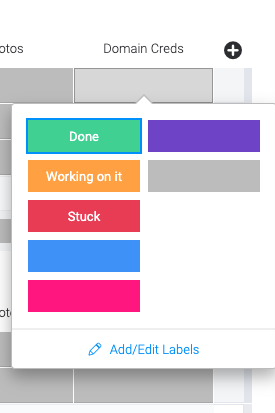
Is there something I’m missing though because the label is shows here as “Done” (unless it has another label behind the scenes) image

I also examine and it seems there seems to be a different structure here when reading the column statuses.

"settings_str": "{\\"labels\\":{\\"0\\":\\"Working on it\\",\\"1\\":\\"Done\\",\\"2\\":\\"Stuck\\",\\"14\\":\\"\\",\\"12\\":\\"\\",\\"7\\":\\"\\"}}"

Also tried updating it with the indexes, it just makes any value null as well
value: "{\\"ids\\":[\\"2\\"]}"


  • Community Expert
  • August 6, 2020

Hey @paulpop ,
the mutation for the value of a status column looks like this:

mutation {

          change_column_value (

                board_id: "YOUR_BOARD_ID",
                item_id: "YOUR_ITEM_ID",
                column_id: "YOUR_STATUS_COLUMN_ID",
                value: {\\"index\\": 1}) {

                       id

          }

    }

Just insert any index instead of the “1”.
Note that doing it this way, the indexes have to exist already.
You can read more about that in the documentation under column-values-section-status

Greetings


JCorrell
Forum|alt.badge.img
  • Community Expert
  • August 6, 2020

To use labels in updating the status, the syntax is:

.... value: "{\\"label\\":\\"Done\\"}"....

  • Participating Frequently
  • August 6, 2020

Thanks, I tried this as well, executed it but do not see the actual update? Updating through the index seemed to work though.

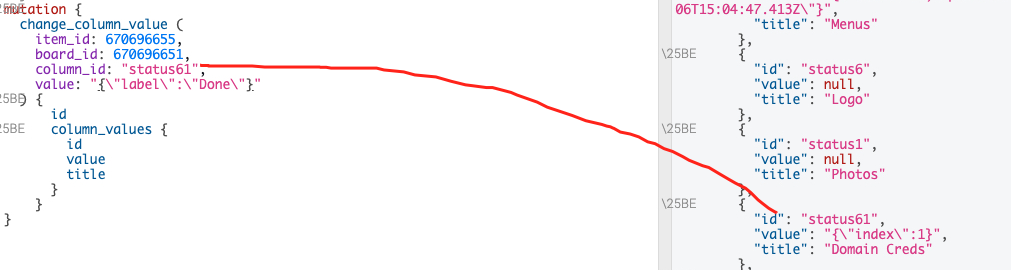
Screenshot of executing update with label.

Edit: I ran this again and it seemed to work now.


  • Participating Frequently
  • August 6, 2020

Hmm just tried and it works ha. Thanks everyone


  • Participating Frequently
  • August 6, 2020

Do you know if these indexes are set in stone for each label? Is there a way to view the indexes through the interface or would we have to query them through settings_str?


AlexSavchuk
Forum|alt.badge.img
  • monday.com Team Member
  • August 8, 2020

@paulpop that’s a great question! You can find all of our indexes by color in this board view:

https://view.monday.com/471878000-13f8e67ced7f0463687b9694f8044fac

@TMNXT-Dev and @JCorrell - thanks for helping out in the thread guys, you’re awesome! 🙂

The indexes are always the same for each color, so you could use that as a reference sheet 🙂

-Alex


  • Community Expert
  • August 14, 2020

Hey @AlexSavchuk ,

this is a really helpfull boardview, do you have more of this kind ? So we could refer to?


AlexSavchuk
Forum|alt.badge.img
  • monday.com Team Member
  • August 15, 2020

@TMNXT-Dev

Thanks for the feedback and I definitely agree! I am not aware of other board views that I can share right off the bat, but I’d definitely love to hear if you have any suggestions for us when it comes to making those board views - your feedback would help us make those happen 🙂

-Alex


  • February 25, 2021

This topic was automatically closed 7 days after the last reply. New replies are no longer allowed.